Product Graveyard Posts

Posted By

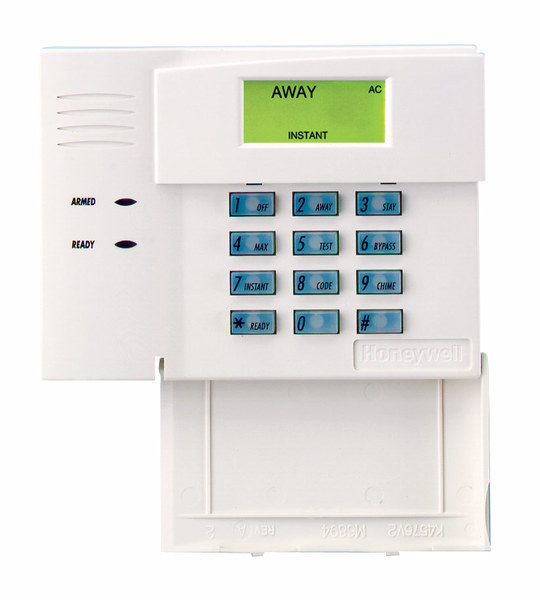
Resideo announced this week that the 6148 keypad family is discontinued upon stock exhaustion. The official technical notification confirms that the 6148, 6148ICON, 6148EX, and 6148SP are all going away. If you need a similar, budget-friendly alternative look no further than the 6150.


The 6148 was never a glamorous keypad. It didn't have a touchscreen. It didn't talk to you. It was just a simple, reliable Fixed English keypad that did exactly what it was supposed to do. And honestly, that's what made it great.

The 6148 was the kind of keypad you could explain to your grandmother over the phone. You pressed buttons, the system responded, and that was that. No learning curve. No software updates. No wondering if the display would freeze. Back when touchscreens were still a novelty, most homeowners just wanted something that worked. The 6148 worked.

The 6148ICON was the same idea but with pictures instead of words. Little icons showed you what each button did. Some installers loved it. Others thought it was unnecessary. But it found its audience with customers who preferred visual cues over text.

The 6148EX added a tamper switch, which made it popular for commercial installations where someone might try to mess with the keypad. The 6148SP served Spanish-speaking customers. Each version filled a specific need in the market.

Now they're all going away because that's how this industry works. Parts become obsolete. Manufacturing priorities shift. Products that served us well for years eventually reach the end of their run.

The good news is that Resideo has recommended solid replacements. The Honeywell 6150 Fixed English Keypad takes over for the 6148, 6148ICON, and 6148EX. It has the same Fixed English display and basic functions, plus four dedicated function keys for quick arming and emergency buttons. The only thing missing is the tamper feature from the 6148EX, so keep that in mind if tamper protection matters to your installation.

For the 6148SP, Resideo suggests upgrading to the First Alert VISTAH3 system with the VISTAHPKP or VISTAHLKP keypads. These offer Spanish and Portuguese language support on a 2x16 alpha display.

If you're still running 6148 keypads on your VISTA system, now is the time to think about stocking up or planning your upgrade. Once the remaining inventory is gone, it's gone for good.

It's strange to get sentimental about a keypad. But the 6148 represents an era of alarm products that valued simplicity and reliability above all else. No apps. No cloud connections. Just a keypad on the wall that lets you arm and disarm your system. There's something to be said for that.

The alarm industry keeps moving forward. Panels get smarter. Keypads get touchscreens. Everything connects to the internet. That's progress, and it's mostly good. But every now and then, when a product like the 6148 gets discontinued, I think about how far we've come and what we've left behind along the way.

If you have questions about replacing your 6148 keypads or need help choosing the right option for your VISTA system, reach out to us at Alarm Grid. The best way to reach us is at support@alarmgrid.com. We're here from 9:00 AM - 8:00 PM EST Monday - Friday and we're happy to help you navigate the transition. Check out our alarm monitoring plans while you're at it.

Tags: , , , , , , , , , , , , , , , , , , ,

Comments


Posted By

Back in 2019 we told you about the Lyric Gateway's end-of-life. Recently we found that an unregistered Lyric Gateway can't be activated. This is because of a disconnect between AlarmNet360, the platform used to register, and the panel. If you have a registered Gateway, you are not affected.


Since the Lyric Gateway hasn't been available since 2019, this is likely not an issue that will affect a lot of people. But, since the secondary market for alarm panels is alive and well on platforms like ebay, and because the Lyric Gateway can't be programmed through the panel's touchscreen, it's still necessary to get this information out there.

When Resideo discontinues a product, they continue to fully support that product for five (5) years, then it moves to limited support. That means Resideo will only provide written documentation for the product to anyone requesting support. They will not provide over-the-phone troubleshooting.

Between 2019 and now, if we had an issue with a Lyric Gateway not registering properly, we could contact Resideo technical support and they would assist with the registration. Their support team has access to tools that we don't and can resolve some issues with registration that we can't. However, now that the Gateway has entered limited support, Resideo tech support will no longer offer this assistance.

So, if you see a Lyric Gateway for sale in some secondary marketplace, we recommend you give it a pass. If you have an unregistered Lyric Gateway with any SIX Sensors paired with it, you'll need to take special steps to keep those sensors viable for use with a new panel.

  1. Be sure sensors are powered on. Be sure that every SIX sensor that is paired with the Gateway panel is powered on and within range of the panel.
  2. Default the Lyric Gateway When you're ready to move the SIX sensors to a new First Alert PROA7, PROA7PLUS, or VISTAH3 panel, remove the set screw in the bottom edge of the panel, then either pull the rear cover off, or pull the panel away from the rear cover (if wall mounted). This will expose the battery, RJ45 port, and the microswitches on the back of the panel.
    • For Rev. 1.00 panels, reboot the panel. To do so, using a paper clip or similar small tool, depress the center microswitch on the back of the panel (see image below) until the panel reboots. Once the panel boots back up, you have five (5) minutes to complete the default. Otherwise, you'll need to reboot again.
    • For Rev. 1.01.0215.531+ you can skip the power cycle and move straight to Step 3.
  3. Perform the default. On the rear of the panel, just below the RJ45 Ethernet port you'll see three microswitches. As you face the back of the panel use a small tool, paper clip, or similar item to press and hold down the left switch for twenty seconds, or until the panel prompts you to enter the Installer Code. After twenty seconds, or once prompted for the Installer Code, release the switch. If prompted for the code enter the panel's current Installer Code. This will set the panel back to factory defaults. As part of the default, a signal will be sent from the panel to all SIX sensors releasing them so that they are no longer paired. All SIX sensors previously programmed with the panel that receive this message are now free to be paired with a new panel.

Any paired SIX sensor that doesn't receive a release signal from the panel, either by the sensor being removed via AlarmNet360 or by defaulting the panel, will be unable to pair with a new panel.

Tags: , , , , , , , , , , , , , ,

Comments


Posted By

As we told you in February, Resideo is sunsetting first-gen Total Connect 2.0 cameras. After July 31, 2025, they’ll no longer work in TC2 and will be removed from all accounts. Any recorded clips will also be deleted. Be sure to download and save any important footage outside of TC2 now.

The sunsetting of first-gen Total Connect 2.0 cameras is now just days away. If you still have any of the original TC2 cameras on your account, you should be preparing to replace those cameras with new ones. Otherwise, you will lose video coverage in those areas.

Even more important is downloading any critical video clips uploaded from first-generation cameras. Once the sunset occurs, both the cameras and their recorded footage will be removed from Total Connect 2.0 and will likely be unrecoverable.

It's easy to save these video clips from Total Connect 2.0.

  1. Log into TC2 as normal.
  2. Tap Activity from the menu options at the bottom of the screen, or from the left navigation pane, if you're logged in on the website.

  3. From the Activity screen, find the clip you want to save.
  4. Tap the three dots to the right of the clip title and then choose Download.
  5. In iOS you can access your downloaded clip from Photos. In Android devices, the options may vary depending on device manufacturer, but generally you can access the clip from Files (All or Downloads) and from Gallery:


  6. Recommended VX Series Replacements for EOL Cameras
    Product Name Recommended Replacement
    IPCAM-WI VX5 Indoor Camera
    IPCAM-WI2 VX5 Indoor Camera
    IPCAM-WL VX5 Indoor Camera
    IPCAM-WO VX3 Outdoor Camera
    IPCAM-PT/IPCAM-PT2/PT2A One or More VX5 Indoor Cameras
    ACU Replace ACU and Camera with appropriate Indoor or Outdoor VX5 Camera
    AP/WAP-PLUS/WREX No Replacement Available

The first Total Connect 2.0 cameras did their job well after launching in late 2011 or early 2012, but video tech has come a long way since then. Today's AI motion detection is way better than the old method of analyzing pixel-changes. The newer cameras, such as those in the table above, use AI to actually tell the difference between a person and an animal, for example. With all the available improvements, it makes sense to phase out the original cameras.

Tags: , , , , , , , , , , , , ,

Comments


Posted By

Time for the CellBounce to, well, bounce. This device, which served as a temporary bridge for AT&T customers clinging to their 3G communicators, is now being discontinued. For those who rely on CellBounce to convert 3G signals for use on the LTE network, it's time to consider the next steps.


Mark your calendars: as of May 1, 2025, AT&T will officially cease support for CellBounce devices on its network. This means if you're currently relying on a CellBounce to bridge the gap between your old AT&T 3G/4G communicator and the AT&T LTE network, it's time to upgrade.

Failure to upgrade to a new LTE communicator, or a new system before the deadline will likely result in a complete loss of communication, compromising alarm signals. This includes critical life-safety signals like fire and carbon monoxide alerts.

You may be wondering which communicator to choose. Below, we'll give you some suggestions for how best to move past the Resideo CellBounce and that old 3G/4G communicator:

Alarm Panel LTE Communicator Recommended
Replacement
Panel
New Panel
LTE Communicator
L3000 LTE-L3A (AT&T)
LTE-L3V (Verizon)
PROA7PLUSC PROLTE-A (AT&T)
PROLTE-V2 (Verizon)
Lynx Touch
(L7000
L5210
L5000
Panel Firmware
9.00.209+
required)
LTE-L57A (AT&T)
LTE-L57V (Verizon)
PROA7PLUSC PROLTE-A (AT&T)
PROLTE-V2 (Verizon)
VISTA-20P
VISTA-15P
VISTA-10P
LTEM-XA (AT&T)
LTEM-XV (Verizon)
LTEM-PA (IP & AT&T)
LTEM-PV (IP & Verizon)
LTEM-PXA (IP* & AT&T)
LTEM-PXV (IP & Verizon)
LTEM-PIA
(IP & AT&T UL Residential Fire Rated)
LTEM-PIV
(IP & Verizon UL Residential Fire Rated)
VISTAH3 PROLTE-A (AT&T)
PROLTE-V2 (Verizon)
VISTA-21iP LTEM-XA (AT&T)
LTEM-XV (Verizon)
LTEM-PA (IP & AT&T)
LTEM-PV (IP & Verizon)
LTEM-PXA (IP & AT&T)
LTEM-PXV (IP & Verizon)
LTEM-PIA
(IP & AT&T UL Residential Fire Rated)
LTEM-PIV
(IP & Verizon UL Residential Fire Rated)
Must Disable Internal Comm.
VISTAH3

VISTA-21IPLTE
PROLTE-A (AT&T)
PROLTE-V2 (Verizon)

LTE-21V (Verizon)
No AT&T Option Available
for the VISTA-21IPLTE


*The LTEM-PXA and LTEM-PXV are unique in that they can support either a wired Ethernet connection or WIFI. To use WIFI, either the PROWIFI (WIFI Only) or the PROWIFIZW (WIFI and Z-Wave) module must be added.

We realize upgrading to a new panel may be a big undertaking for a DIYer. We've got content on upgrading from a VISTA-20P to a VISTAH3 and on upgrading from several older panels to the PROA7PLUS:

If you fail to replace the Resideo CellBounce before the deadline, here's what you may experience:

  • Communication Failures: "Comm fail," or communication failure, means your alarm system's regular check-in with AlarmNet didn't happen and they sent a message to the monitoring station. These supervision check-ins usually occur daily or monthly. If a comm fail happens, the monitoring station will normally contact the alarm dealer, who will then contact you, though exact procedures may vary. For Alarm Grid customers with cellular communicators, these check-ins are typically set for every day. It is possible that your system is set as "unsupervised". If that is the case, your system might be incapable of communicating and neither you nor the monitoring station would know.
  • Trouble message on display. This issue can vary widely, depending on your panel type and supervision settings. When a cellular communicator is in use, there is a "cell fault time" setting within communicator programming. By default, this is usually set to 60 minutes. With this setting, if the communicator loses contact with the cellular network for 60 consecutive minutes, a trouble message is displayed by the panel. This means you'll likely see that there is a problem before your alarm dealer. This may be displayed as a bF or Check 103 depending on the panel and keypad used. If a CellBounce is the issue, the most effective way to clear this message permanently is to disable the cellular communicator in panel programming. This will effectively disable cellular reporting. A better option is to upgrade the communicator or the system.

If you happen to have an IP and GSM communicator, it is usually possible, depending on your communicator version, to disable only the cellular path for the communicator. This will leave the IP communicator working. This might be a temporary solution, until you can upgrade to a new LTE communicator, or a new system.

The CellBounce was always intended as a short-term fix for a long-term problem. Let's face it, some people just don't like being told they have to upgrade their stuff. I remember when the old 2G network shut down, I had family members who clung to their old phones right up until the bitter end! But eventually, we all have to move with the times. Funny thing is, those same family members wouldn't give up their smartphones without a fight today.

Tags: , , , , , , , , , , , , , , ,

Comments


Posted By

Resideo, in a February 17, 2025, announcement, declared the end-of-life (EOL) for its first-generation Total Connect 2.0-compatible cameras. These cameras will no longer function with the TC2 platform after July 31, 2025. Resideo recommends replacing them promptly for uninterrupted service.

The following cameras and accessories are affected by this notice:
Product Name Image
IPCAM-WI
IPCAM-WL
IPCAM-PT
IPCAM-WI2
IPCAM-WO
IPCAM-PT2A
WAP-PLUS
WREX
ACU

The VX Series cameras from Resideo are now available for use with Total Connect 2.0, providing a significant upgrade in performance and features. Improvements include enhanced image resolution and quality, sophisticated AI event detection (allowing for more precise alerts), and integrated two-way audio functionality.

The VX Series doesn't directly replace some older camera equipment. Specifically, it lacks replacements for the first-generation pan-tilt camera, the ACU (analog converter unit), and the WAP-Plus access point. If you need to replace these older devices, Resideo suggests using one or more VX5 indoor cameras in place of the IP-CAM PT/IP-CAM PT2. Cameras currently connected to ACUs should also be replaced with the appropriate VX Series camera.

Recommended VX Series Replacements for Cameras at EOL:
Product Name Recommended
Replacement
IPCAM-WI VX5 Indoor Camera
IPCAM-WI2 VX5 Indoor Camera
IPCAM-WL VX5 Indoor Camera
IPCAM-WO VX3 Outdoor Camera
IPCAM-PT/IPCAM-PT2/PT2A One or More VX5 Indoor Cameras
ACU Replace ACU and Camera with appropriate Indoor or Outdoor VX5 Camera
AP/WAP-PLUS/WREX No Replacement Available

It's true what they say: all good things must come to an end. And while the original Total Connect 2.0 cameras were mediocre by today's standards, they served a vital purpose in a market with few options at the time. They were especially useful for DIYers looking to add integrated video to their alarm systems without a lot of extra complexity.

The VX Series cameras offer the modern features customers expect, integrating seamlessly with Total Connect 2.0, PROSeries panels, and the VISTAH3 (via its touchscreen keypad). For now, Resideo is keeping it simple, offering one (1) indoor camera, one (1) outdoor camera, and one (1) video doorbell option in the VX Series.

Tags: , , , , , , , , , , , , , , , , , , ,

Comments


Posted By

In an email last week, Johnson Controls, the parent company of Qolsys, announced the discontinuation of both the Qolsys IQ WIFI and the Qolsys IQ WIFI 6. These purpose-built routers, accessible via Alarm.com, were meant to prevent security equipment disconnections due to end-user errors.


We first told you about the IQ WIFI 6 in October 2022. It offered an elegant solution for users with security systems. The IQ WIFI 6, designed to act as the router while IQ WIFI units functioned as Wi-Fi nodes, created a mesh network with a unique security partition accessible only by the alarm dealer.

This, combined with remote access through Alarm.com, prevented costly service calls when customers made changes to their network, then inadvertently neglected to update their security system components.

Unfortunately, it didn't catch on. End-users interested enough in their network to invest in a specialized router prioritized optimizing their network for gaming or streaming video, rather than ensuring reliable connectivity for their security systems and WIFI cameras.


If you own an IQ WIFI 6, rest assured it will continue to function as usual. Alarm.com has pledged ongoing support, allowing dealers to remotely access and troubleshoot internet connectivity for your system. The IQ WIFI is not accessible through Alarm.com, so with the end-of-sales notice, they will no longer offer live setup support for the IQ WIFI.

Alarm Grid has discontinued both the IQ WIFI and IQ WIFI 6 on our website. We do not maintain stock, and our distributor has very limited inventory available. To avoid accepting orders that we cannot fulfill, we have decided to discontinue both products immediately.

The discontinuation of the IQ WIFI and IQ WIFI 6 raises concerns about the future of these products. If you're an existing user, we'd love to hear about your experiences with these devices. Share your thoughts and any concerns you may have in the comments below. It's frustrating when a purchased product is discontinued by the manufacturer. Alarm Grid is here to help our customers in whatever way we can.

Tags: , , , , , , , , ,

Comments


Posted By

Resideo announced today that the final Lynx product still being manufactured is discontinued, effective immediately. Some components required to produce the LynxTouch L5210 panel are obsolete, so the decision has been made to move on. Rest in peace LynxTouch. You were a good product.

I was never meant to be an alarm technician. I went to school for networking, and I had a job doing technical support for an ISP. Then the Dot-com Bubble burst in 2000 and suddenly there was a surplus of qualified candidates for every networking job. The ISP I worked for went out of business, so I knew that there were at least forty other people looking for the same networking jobs I was.

I saw an advertisement for a technical support specialist at Ademco. I studied up on the company, and what it offered. The largest manufacturer of alarm products in North America. Not bad! The main reason I applied was that I knew none of the other people who were also in the process of losing their jobs, would. I figured I could continue looking for networking jobs if I managed to get hired. I went into it actively not wanting the job. I literally said, "I'll probably get this job because I don't want it."

I had an interview and got a tour. They were interested in me because of my networking background. They were about to begin supporting a touchscreen keypad that had an internet connection and most of their alarm technicians were not good with software, computers, or networking. I left the interview thinking, "I probably won't get this job because now I want it."

But I did get the job, and for the first few months, I thought I would fail. I had no electronics background and no alarm panel background. They trained me on downloading software first. For the first week, I bet I didn't say two words all day long during training. At night I went home saying, "What do they mean 'control panel'?!" What everyone else in the world called a download, they called an upload, and vice versa. Eventually, I made it to alarm panel training.

At that time, in early 2001, the Lynx panel lineup was their only wireless all-in-one panel. Its competition was the Simon panel lineup from ITI/Interlogix/GE. Both manufacturers' panels spoke, and both spoke with a female voice. For a person who didn't have any experience with wiring or resistors, it was like an oasis in a desert of hardwired panels. The Lynx could be a bear to program because it didn't have an actual alpha display, but nearly every Lynx panel in use was exclusively using wireless sensors.

I really liked the early Lynx panels. My reasons were selfish. The thing that made it difficult for others wasn't a problem for me. The menu prompts, particularly in zone and output programming, made perfect sense. The feature that made other panels difficult for me, various wiring scenarios, was almost completely absent from the Lynx. Working with Lynx panels gave me the confidence to stick with alarms until I could master the rest of the product line. Also, because a Lynx panel would allow you to record a custom voice descriptor for a zone, you could use it to play some pretty good pranks on fellow technicians.

That was twenty-one years ago. I was so intent on trying to master this technology I didn't have time to look for a networking job. Anyway, I had found a home in this industry. Interlogix shut down its North American alarm operations at the end of 2019. So, the Lynx has outlived its old nemesis the Simon panel. Earlier this year, Resideo announced that it would discontinue the Lynx 3000 and LynxTouch L7000 panels. The L5210 was the final remaining Lynx system, and now it too is discontinued. Forgive me if I get a little misty-eyed and nostalgic. After all, I'm saying goodbye to an old friend.

Tags: , , , , , , , ,

Comments


Posted By

Resideo announced last week that due to a required component becoming obsolete, they are forced to discontinue the popular 5800FLOOD sensor. There is still some available stock, so Alarm Grid has not yet discontinued it, but once all stock has been exhausted, the 5800FLOOD is gone for good.

The 5800FLOOD is popular because unlike the 5821, it doesn't require that a water probe be added to the sensor. Water detection is built-in, and configuration is easy. Another benefit of the 5800FLOOD is that it will alert for flooding more quickly than the 5821. The prongs of the 5800FLOOD need only be in contact with water for about 25 seconds before a signal is sent to the alarm panel. The 5821 flood probe must be in contact with water for about three (3) minutes before sending a signal.

In addition to flood sensing, the 5800FLOOD also monitors for extreme cold and/or hot temperatures locally. This is done using a temperature sensor that is built into the 5800FLOOD. For cold temperature sensing, if the ambient temperature drops below 45℉ (7.2℃) for more than 15 minutes, an alert is sent using Loop 1. For high-temperature sensing, if the temperature rises above 95℉ (35℃) for more than 15 minutes, then an alert is sent using Loop 2. The flood sensor transmits using Loop 3.

Now that the 5800FLOOD is being discontinued, the Resideo and Honeywell Home 5821 is the recommended replacement. One drawback to the 5821 is that it requires a remote probe be added for flood sensing, and for freeze sensing. However, only one (1) remote probe can be used per transmitter, so if you need to monitor for both flood and freeze, two (2) 5821s are required.

The 5821 supports the following functions:

Loop Number Sensing Capability Description
Loop 1 Ambient Low Temperature Sensing <45℉ (7.2℃) >10 Minutes sends alert
Loop 2 - Local Ambient Warm/Hot Temperature Sensing >75℉ (23.8℃) >10 Minutes sends alert; >95℉ (35℃) >10 minutes sends alert. Disabled when any remote probe is used!
Loop 2 - Remote Using T280R or TS300R Remote Probe Freeze Sensing >10℉ (-12.2℃) for 30 minutes; Refrigerator Sensing >42℉ (5.5℃) for 30 minutes. Can't be used if the Flood Probe is used.
Loop 3 - Remote Uses FP280 or 470PB Remote Probe Flood Sensing - Signals when the probe's terminals have been in contact with at least 1/4" of water for > 3 Minutes. Can't be used if the Temp Probe is used.

For flood sensing, we recommend using the FP280 as it includes wiring, and the required resistor is already in place. With the 470PB, the user is responsible for providing their own wire and must add the 2.2 MΩ resistor themselves. In all cases, wiring between the 5821 and whichever remote probe is used should be made as short as possible, and should not exceed 96" (243cm). Be sure to read the full Install Guide for the 5821 for all of its various quirks.

Supply chain shortages claim another victim in the 5800FLOOD. It seems like only yesterday that we were excitedly telling you about it. What are your thoughts on the demise of this "New and Improved" environmental sensor? Leave us a note in the comments, as we always love hearing from our readers.

Tags: , , , , , , , , , , , , , , , , , , ,

Comments


Posted By

Effective in August of 2022, Alarm.com is ending sales of Alarm.Com Image Sensors (ADC-IS-220-GC and ADC-IS-300-LP). Alarm Grid has already discontinued these sensors due to the fact that they are in short supply, and no more of them will be produced. Only the Honeywell Home PROINDMV remains.

The 2GIG IMAGE3:


There was some overlap between the Alarm.com Image Sensor models, and the 2GIG and Qolsys Image Sensor models. I have confirmed with Alarm.com that the 2GIG and Qolsys models are also discontinued as of August, 2022. Currently, the only Image Sensors being offered by Alarm Grid are the DSC PowerG and Honeywell Home PROINDMV models which are discussed in more detail below.

Image sensors were a great idea that never really took off. The original image sensors, first offered by 2GIG and Alarm.com, did not have particularly good resolution or picture quality, which is probably one reason they weren't widely adopted by the DIY crowd. By the time the 2nd generation of these sensors came around, people were prepared to simply go with full-on video monitoring or to avoid capturing images altogether.

Both the second and third-generation image sensors that were offered by 2GIG, Qolsys, and Alarm.com had very good image quality. Combine that with Alarm Grid's policy of offering monitoring for image sensors without an additional price markup, and the image sensor was a viable alternative to the use of video cameras. An Alarm.com user could log into their account and perform a "peek-in", meaning they could request that a particular image sensor grab a picture of whatever it was able to see at that moment, and the image (actually two (2) images) would then be uploaded to the customer's alarm.com account for viewing. The sensor could also take images upon sensing motion after a particular period of inactivity, or upon an alarm. For full details on image sensor features and operation, check out this prior post.

DSC offers a couple of PowerG PIR Cameras that will work with the Qolsys IQ Panel 2 and IQ Panel 4 in addition to the DSC PowerSeries Neo panels with a PowerG Transceiver added. These are the DSC PG9934P, Indoor PIR Camera, and the DSC PG9944, Outdoor PIR Camera. These sensors work like any other PowerG Sensor with the Qolsys Panels. They can only capture images when the system is armed and the image sensor is active (not bypassed). They send their images to the panel, and then the first image is uploaded to Alarm.com. A total of ten (10) images are taken, and these images are stitched together by the panel into a sort of stop-motion video where each image can also be viewed individually. This is done via the panel screen itself. When used with the PowerSeries Neo panels, the DSC PIR Cameras can be used for Visual Verification only, they do NOT work like a regular image sensor with Alarm.com.

DSC PG9934P, Indoor Image Sensor:

DSC PG9944, Outdoor Image Sensor:


The Honeywell Home PROINDMV is a wireless PIR motion sensor with a camera built-in, just like the 2GIG, Qolsys, and Alarm.com image sensors were. The PROINDMV is currently only supported on the Resideo PROA7PLUSC, and Honeywell Home PROA7PLUS panels. There is no "peek-in" option for these image sensors. They can only capture images when they sense motion while the system is armed in Away mode. Images or videos are captured and uploaded to Total Connect 2.0 for viewing. The user can choose to receive either a still image or a 10-second video clip. You can read their full details of operation in our previous post.

Honeywell Home PROINDMV:


It seems like the era of the image sensor may be coming to a close, at least for now. Who knows, once we're through the global chip shortage, and the availability of components is back to normal, perhaps the humble image sensor will experience a revival. If so, DIYers may want to consider giving these sensors a try. They really are an excellent idea. They can be used for alarm verification in this age of increasing police resistance to alarm response, and they are cheaper, both initially and on an ongoing month-to-month basis, than video cameras.


Tags: , , , , , , , , , , , , , , , , , , , , , ,

Comments


Posted By

Resideo sent out a notice on March 16 that the Lynx 3000 and the LynxTouch 7000, (aka the L3000 and the L7000) are discontinued. The Lynx Touch 5210 (L5210) is still being manufactured. This marks the end of an era for this product line as there is now no push-button panel option available.

Alarm Grid has already discontinued the L3000 panel because there are none in stock. There are some L7000 panels in inventory, so you can still purchase one of those panels, for now. However, as soon as stock is exhausted the L7000 will also be history. Speaking of history, the Lynx panel has had quite a run. The original Lynx panel was released in the 1990s and didn't even have a rechargeable battery.

The next iteration, the Lynx-R (R for Rechargeable), came along very soon after the Lynx (for obvious reasons). Then the LynxR-24, the LynxR-EN. There were so many different versions over the next 20 years. It used to be quite a job just figuring out which Lynx panel someone had when they needed support! It wasn't always a requirement that you know the version in order to solve the issue, but at times, the version information was crucial.

In the early 2010s the LynxTouch panels came along with the introduction of the LynxTouch L5000. That panel was missing some key features. It couldn't support any type of internet communication. It didn't have a back door into programming, so if you lost the Installer Code, well, that was too bad. So, pretty soon the L5100 was released with desirable features included that were missing in the L5000. We have an entire video devoted to discussing the versions of the LynxTouch panels, their differences, and how you can tell them apart.

Now, we're saying goodbye to the Lynx 3000, and the LynxTouch L7000. Since the first Lynx panel was introduced nearly 30 years ago, this is the first time there is no push-button version of a Lynx available. These panels have been very popular in apartments and dormitories, and I'm sure they will be missed. They are being replaced by the Honeywell Home PROA7, the Resideo PROA7C, the Honeywell Home PROA7PLUS, or the Resideo PROA7PLUSC.

The Lynx lineup is not completely gone, though. The Resideo LynxTouch 5210 (L5210) is still being manufactured. This panel occupies the middle ground between the L3000 and the L7000. It has a touchscreen, though it is rather small at 4.3 inches. It offers nearly all the same features as the L7000, albeit fewer of them. This means fewer zones, and fewer users in addition to the smaller screen, but also a smaller price tag. Check out this comparison between the L7000 and the L5210. This comparison includes the Lyric in addition to the L5210 and the L7000.

What do you think about this discontinuation? Given the fact that they have continued to update communicators for the L3000 to include the LTE products, I thought the L3000 was going to be around forever. Are you surprised at this news? Drop us a line in the comments below and let us know what you think. We enjoy a spirited conversation!

Tags: , , , , , , , , , , , , , , , , , ,

Comments