LTE Cellular Communicators Posts

Posted

If you own a Lyric system and have not already done so, please read this important update regarding AlarmNet360 changes that affect your panel. It may be time for an update!

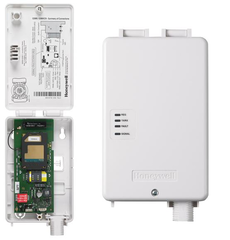
After much anticipation, Resideo has finally released the Honeywell LYRICLTE-V Verizon LTE Communicator for their flagship Lyric Security System. This now gives Lyric users a choice between two fantastic cellular coverage options in the AT&T LTE Network and the Verizon LTE Network.

Honeywell lyric controller encrypted wireless security system

For anyone who doesn't know, an alarm monitoring communicator is a very important accessory for an alarm system. This is the device that allows the panel to send and receive the signals that are necessary for alarm monitoring and remote smart home control. The Resideo Lyric Controller comes with a built-in WIFI card for this purpose. But you can also add a cellular communicator to serve as a backup communication path in case the internet ever goes down or becomes unavailable.

Previously, Lyric System users were restricted to the Honeywell LYRICLTE-A AT&T LTE Communicator for cellular backup. This presented a problem for Lyric System users in areas not covered by the AT&T LTE Network. These users were forced to forgo the ever-important cellular backup for their systems. The Honeywell LYRICLTE-V Verizon LTE Communicator finally provides a much-needed answer for these users.

It is also important to pay special mention to the Verizon LTE Network itself. LTE stands for "Long-Term Evolution". Cellular service providers like Verizon have been working hard to establish robust and powerful infrastructure for their LTE Networks over the past several years. These networks are not going away any time soon. The LTE networks represent both the present and the future for cellular communication.

By choosing an LTE communicator like the LYRICLTE-V, you are ensuring that your Lyric System can remain monitored for many years to come. Even as Resideo prepares to release the upcoming Resideo PROA7PLUS Wireless Security System, your Lyric Alarm System will still be supported. It will continue to work great for alarm monitoring and for smart home automation. The importance of the Honeywell LYRICLTE-V is that it is providing a long-term solution for your panel. This is more than just a communicator. This is a long-term investment to keep your Lyric Controller monitored well into the very distant future.

The LYRICLTE-V module is super easy to install. The process can be completed by any end user. First put the system into its cellular installation mode. You can do this by starting from the main screen and choosing Security > Tools > enter Master Code (default 1234, but usually changed) > Advanced > Install Cellular Module > Yes. Then just follow the onscreen instructions by pushing up on the right-side cover for the panel to reveal the cellular communicator slot. Insert the LYRICLTE-V, and reapply the side cover. Indicate on the Lyric Screen that you have installed the communicator, and the system will complete the process. You will then be able to activate the communicator for monitoring service. Be sure you have a monitoring plan that includes cellular communication before adding the module.

Honeywell lyric lte a at and t lte cellular communicator for the

With its new cell card, your Lyric System will now be capable of utilizing dual-path communication. This means that it will be able to send and receive signals across IP and cellular. IP communication normally serves as the primary communication path, as it is usually faster than cellular. But having that cellular backup is crucial for ensuring that your system always stays monitored and connected. As long as one path is available, your Lyric System will be able to perform all of the functions necessary for alarm monitoring. This includes staying connected with the AlarmNet Servers and Total Connect 2.0.

In order to support the LYRICLTE-V Verizon LTE Communicator, your Lyric System must be running Firmware Update MR9 or higher. As of summer 2019, this is the latest firmware release for the Lyric System. To upgrade the firmware, your Lyric System will need to be connected with the AlarmNet Servers. Since you won't be able to use the cellular communicator until you have MR9, you will need to use a WIFI connection to complete the upgrade.

Keep in mind that if you don't have WIFI access in your primary location, you can bring your Lyric Panel to a different location with WIFI access just for the sake of the upgrade. Then install and activate the LYRICLTE-V, and use a cellular-only path in your primary location. We know that many users don't have WIFI access in their homes. This work-around is perfect for these users, as they can get their systems on the necessary firmware and then use the communication path that works best for their situation. For more information on the MR9 Firmware Update, we strongly recommend reviewing this very recent blog post from Alarm Grid.

Finally, you will need an alarm monitoring plan that includes cellular communication if you want to take advantage of all the benefits that this communicator has to offer. Alarm Grid customers will want to choose a Gold Level monitoring plan or higher to unlock the full potential of the module. This will allow you to activate the communicator with Alarm Grid and provide you with access to the Total Connect 2.0 platform for remote security and smart home functionality. More information is available on our alarm monitoring page.

If you are not interested in Total Connect 2.0, we also offer a Cellular-Only Plan that will provide standard central station monitoring service and connectivity through cellular or cellular and IP. While we strongly recommend taking advantage of all the great features and remote access capabilities of Total Connect 2.0, we understand that some users may just want to keep things simple with non-interactive monitoring service. This Cellular-Only Plan is certainly an option if you want to activate a LYRICLTE-V module for no-frills alarm monitoring.

We are proud to say that the Honeywell LYRICLTE-V Verizon LTE Communicator is now available for purchase on our site. This is the communicator recommended for any Lyric user who finds that Verizon service works best in their area. If you have better coverage from AT&T, the Honeywell LYRICLTE-A AT&T LTE Communicator is still available. Remember, this has nothing to do with your standard cellular service provider. Your alarm system is completely separate from your smartphone. You can have an AT&T Phone and a Verizon Communicator for your alarm system. You should just pick whichever service works best in your area.

If you have any questions about the Lyric Alarm System, the new LYRICLTE-V Verizon LTE Cellular Communicator, or about alarm monitoring in general, please reach out to us. The best way to contact us is to email support@alarmgrid.com. We check our email super regularly, and we make sure to reply to any inquiry as soon as possible. You also have the option of calling us at (888) 818-7728 during our regular business hours of 9am to 8pm EST M-F. We look forward to hearing from you and answering all your important questions.

Tags: , , , , , , , , , , , , ,

Comments


Posted By

We have received news that T-Mobile and Rogers are both scheduled to shut down their 2G networks at the end of 2020. This is important for anyone using Alarm.com who is still using one of these communicators. Time is running out to upgrade your communicator and keep your system monitored!


We have talked about the ongoing 3G sunset on numerous occasions. Most 3G networks are set to be shut down by the end of 2022. Well the 2G sunset is even more pressing. Most of the 2G networks have already been shut down, and very few people are still using a 2G communicator for monitoring service. However, these people are still out there. They need to understand that if they don't take action soon, their panel will no longer provide monitoring service.

At this time, Alarm Grid only has a small number of customers using 2G communicators with their systems. These customers are using the 2G T-Mobile Network or the 2G Rogers Network in Canada to connect with the Alarm.com Servers. We want to make it very clear to these customers that if they do not replace their communicators by the end of 2020, they will no longer have active monitoring service.

We would also like take this opportunity to remind all our 3G customers that they will also have to switch to LTE in the coming years. Although the end of 2022 might seem far away, it certainly doesn't hurt to get a head start. An LTE communicator will provide faster and more reliable monitoring service, making it a great upgrade to make as soon as possible. And we're here to help you make the switch as easily as possible.

Fortunately, most Alarm.com Security Panels allow users to easily upgrade the cellular communicator for their systems. If you are still running a 2G communicator, then now is the time to make the transition to LTE. You can do this with an LTE cellular communicator. Start by powering down your panel by disconnecting its backup battery and unplugging its transformer. Then open it up (if necessary), and remove the old communicator. Install the new LTE communicator in its place, and power your panel back on. You can then contact us to activate your new communicator. If you already had cellular alarm monitoring, then there will be no need to change your monitoring plan.

Most of the LTE communicators available on our site connect with either the AT&T LTE Network or the Verizon LTE Network. You should choose whichever network provides better service in your area. Remember, this has nothing to do with your mobile service provider. Your smartphone and your security system are mutually exclusive devices. You can use a completely different cellular service provider for your alarm system.

If you are in the United States, then you should have no problem using an AT&T LTE communicator or a Verizon LTE communicator in your area. Just go with whichever service works better in your area. If you are currently using a Rogers 2G Communicator in Canada, then things are a little more complicated. We recommend checking this post we made on Alarm Monitoring in Canada.

And if you aren't sure of which communicator to get, you can always ask us for help. The best way to reach us is to email support@alarmgrid.com. We will check your email at our earliest convenience and reply back as soon as possible. You may also call us at (888) 818-7728 during our normal business hours of 9am to 8pm EST M-F. We look forward to hearing from you and helping you determine the perfect security option for your needs.

Tags: , , , ,

Comments


Posted

If you own a Lyric system and have not already done so, please read this important update regarding AlarmNet360 changes that affect your panel. It may be time for an update!

Hi DIYers! We are very happy to announce that software revision 1.09 is now available for the Resideo Lyric Security System. This software revision is more commonly known as firmware update MR9, and it can be downloaded for free by any end user with active alarm monitoring service.

Honeywell lyric controller encrypted wireless security system

The biggest addition that comes from firmware update MR9 is support for the upcoming Verizon LTE Communicator. We expect this communicator to be released sometime later this summer. Support for the existing AT&T LTE Communicator is also carried over to MR9. The update can be pushed down from the Resideo AlarmNet Servers and is completely free of charge. In order for the update to take effect, the system must be disarmed, with no trouble conditions present.

If you want to apply the update yourself when the system is disarmed, you can do so by entering the following commands from the main Lyric screen: Security > Tools > Installer Code (default 4112) > Update Firmware. The button will grey out to confirm that it was selected. Then return to the home screen using the return arrow in the upper-right corner. The update process should begin automatically.


Depending on the speed of the communication path, the update process can take anywhere from a few minutes to up to an hour. The system will then reboot to apply the update. If you want to confirm the update, go to Security > Tools > Master Code (default 1234) > Advanced > System Information. The listed Revision on the top line should start with 1.09.

If you want more information about the MR9 update, please check the associated release notes. If you have any further questions about the MR9 update, please reach out to us. The best way to reach us is to email support@alarmgrid.com. We look forward to hearing from you!

Tags: , , , , , , , , ,

Comments


Posted

If you own a Lyric system and have not already done so, please read this important update regarding AlarmNet360 changes that affect your panel. It may be time for an update!

Hi DIYers! We are very happy to announce that software revision 1.09 is now available for the Resideo Lyric Security System. This software revision is more commonly known as firmware update MR9, and it can be downloaded for free by any end user with active alarm monitoring service.

Honeywell lyric controller encrypted wireless security system

The biggest addition that comes from firmware update MR9 is support for the upcoming Verizon LTE Communicator. We expect this communicator to be released sometime later this summer. Support for the existing AT&T LTE Communicator is also carried over to MR9. The update can be pushed down from the Resideo AlarmNet Servers and is completely free of charge. In order for the update to take effect, the system must be disarmed, with no trouble conditions present.

If you want to apply the update yourself when the system is disarmed, you can do so by entering the following commands from the main Lyric screen: Security > Tools > Installer Code (default 4112) > Update Firmware. The button will grey out to confirm that it was selected. Then return to the home screen using the return arrow in the upper-right corner. The update process should begin automatically.


Depending on the speed of the communication path, the update process can take anywhere from a few minutes to up to an hour. The system will then reboot to apply the update. If you want to confirm the update, go to Security > Tools > Master Code (default 1234) > Advanced > System Information. The listed Revision on the top line should start with 1.09.

If you want more information about the MR9 update, please check the associated release notes. If you have any further questions about the MR9 update, please reach out to us. The best way to reach us is to email support@alarmgrid.com. We look forward to hearing from you!

Tags: , , , , , , , , ,

Comments


Posted By

Resideo will be pushing down an over-the-air (OTA) firmware update for all AlarmNet LTE Communicators later this month. This update will go through automatically, and it should not affect your monitoring service in any fashion. The update will be applied sometime later this month.

Honeywell lte xv alarmnet verizon lte cellular communicator

This update only affects the communicator, not the panel itself. The updates will be applied automatically in batches until it has been applied to every Resideo LTE Communicator. First the Verizon LTE Radios will be updated, followed by the AT&T LTE Radios. Resideo will start each update cycle with batches of units that were registered first. The company will follow a sequential order, finishing with batches of units that were registered last. Any new unit that is activated will be placed at the end of the cycle.

It is possible that your system may reboot as part of this update process. However, it should resume normal operation after the update is complete. Additionally, you may notice the following contact ID codes in your Event Log on Total Connect 2.0:

Contact ID
Meaning
E365 Update Started
R365 Update Finished
E366 Update Failed

Resideo says that this update will allow their LTE communicators to interact more effectively with the cellular network. Users should expect this update to go through sometime later this month. We do not have an exact date as to when the update process will begin. If you have any questions about this update, please contact us at support@alarmgrid.com for more information.

Tags: , , , , , , , , , , , , , , , ,

Comments