First Alert VISTAHLKP Posts

Posted By

Resideo announced this week that the 6148 keypad family is discontinued upon stock exhaustion. The official technical notification confirms that the 6148, 6148ICON, 6148EX, and 6148SP are all going away. If you need a similar, budget-friendly alternative look no further than the 6150.
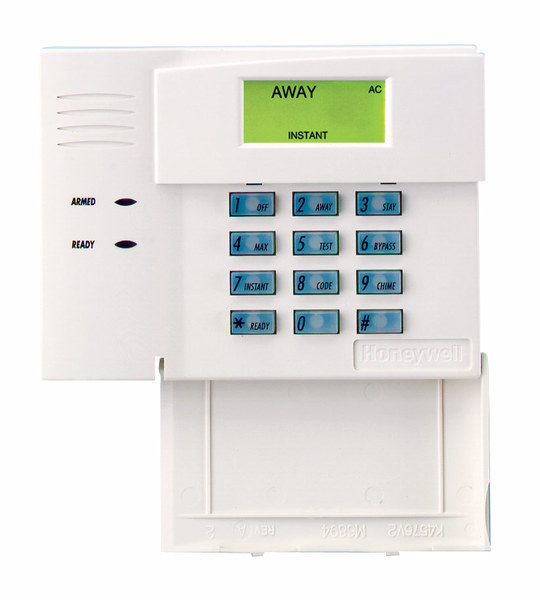

The 6148 was never a glamorous keypad. It didn't have a touchscreen. It didn't talk to you. It was just a simple, reliable Fixed English keypad that did exactly what it was supposed to do. And honestly, that's what made it great.

The 6148 was the kind of keypad you could explain to your grandmother over the phone. You pressed buttons, the system responded, and that was that. No learning curve. No software updates. No wondering if the display would freeze. Back when touchscreens were still a novelty, most homeowners just wanted something that worked. The 6148 worked.

The 6148ICON was the same idea but with pictures instead of words. Little icons showed you what each button did. Some installers loved it. Others thought it was unnecessary. But it found its audience with customers who preferred visual cues over text.

The 6148EX added a tamper switch, which made it popular for commercial installations where someone might try to mess with the keypad. The 6148SP served Spanish-speaking customers. Each version filled a specific need in the market.

Now they're all going away because that's how this industry works. Parts become obsolete. Manufacturing priorities shift. Products that served us well for years eventually reach the end of their run.

The good news is that Resideo has recommended solid replacements. The Honeywell 6150 Fixed English Keypad takes over for the 6148, 6148ICON, and 6148EX. It has the same Fixed English display and basic functions, plus four dedicated function keys for quick arming and emergency buttons. The only thing missing is the tamper feature from the 6148EX, so keep that in mind if tamper protection matters to your installation.

For the 6148SP, Resideo suggests upgrading to the First Alert VISTAH3 system with the VISTAHPKP or VISTAHLKP keypads. These offer Spanish and Portuguese language support on a 2x16 alpha display.

If you're still running 6148 keypads on your VISTA system, now is the time to think about stocking up or planning your upgrade. Once the remaining inventory is gone, it's gone for good.

It's strange to get sentimental about a keypad. But the 6148 represents an era of alarm products that valued simplicity and reliability above all else. No apps. No cloud connections. Just a keypad on the wall that lets you arm and disarm your system. There's something to be said for that.

The alarm industry keeps moving forward. Panels get smarter. Keypads get touchscreens. Everything connects to the internet. That's progress, and it's mostly good. But every now and then, when a product like the 6148 gets discontinued, I think about how far we've come and what we've left behind along the way.

If you have questions about replacing your 6148 keypads or need help choosing the right option for your VISTA system, reach out to us at Alarm Grid. The best way to reach us is at support@alarmgrid.com. We're here from 9:00 AM - 8:00 PM EST Monday - Friday and we're happy to help you navigate the transition. Check out our alarm monitoring plans while you're at it.

Tags: , , , , , , , , , , , , , , , , , , ,

Comments


Posted By

For those end-users who desire a more traditional keypad for their First Alert VISTAH3, the First Alert VISTAHLKP wired landscape keypad is now available. Unlike older hybrid systems like the VISTA-20P, though, this keypad will only allow you to control the security system, not program it.


Aside from its traditional appearance, the First Alert VISTAHLKP has another distinct advantage over its wireless touchscreen counterparts. It is a wired keypad, and it connects to the panel using the iBus. The VISTAH3 introduces a new bus technology called iBus that replaces the older Enhanced Console Protocol (ECP) used by the VISTA-20P and other VISTA panels.

This new bus protocol uses RS-485, a frequently used hardware and driver architecture common in industrial automation. This allows for more flexibility in wiring, and longer wire runs for wired bus devices. It is Alarm Grid's belief that every VISTAH3 panel should have at least one (1) wired keypad, for occasions when wireless keypads may not be functioning properly.


  1. 2X16 LCD Display
  2. Power LED
  3. Status LED
  4. Disarm (Off) Key
  5. Arm Maximum (Away, No Entry Delay)
  6. Arm Instant (Stay, No Entry Delay)
  7. Medical Panic
  8. Panic
  9. Fire Panic
  10. Police Panic
  11. Status (scroll)
  12. No Other Function
  13. System Tests
  14. # Key
  15. Quick Arm Night Option
  16. Chime (Toggle)
  17. Quick Arm Home Option
  18. Bypass Sensors
  19. Quick Arm Away Option
  20. Arm Stay
  21. Arm Away
  22. Trouble LED

Using the VISTAHLKP with the VISTAH3 is very similar to using a Honeywell 6160 keypad on a VISTA-20P or similar panel. The following commands can be used:

  • Arm (Away/Stay/Instant/Max/Night)
    • When the system is not ready, quick arming, if enabled, will automatically bypass faulted zones at the end of exit delay.
  • Disarm
  • GOTO (allows the user to log onto a separate partition, if their user code has access)
    • Returns to home partition after 30 seconds of no activity
  • Add/Edit/Delete User Codes
  • Bypass Zones

Excerpt from the User Guide showing Quick Arming icons and corresponding keypad commands:

Each First Alert VISTAHLKP can display either English or French language, depending on the language selection in the VISTAH3 panel. The keypad connects to the panel's iBus terminals as shown:


Wiring Limits for iBus Based on Current Draw and Wire Gauge:
Wire
Gauge
(AWG)
Total Current of All Devices Connected to a Single Wire Run
50mA or Less 100ma 300ma 500ma 600ma
#22 AWG 700' (213m) 350' (107m) 120' (37m) 70' (21m) 60' (19m)
#20 AWG 1200' (366m) 600' (183m) 200' (61m) 120' (37m) 100' (30m)
#18 AWG 1900' (579m) 950' (290m) 320' (98m) 190' (58m) 160' (49m)
#16 AWG 3000' (914m) 1500' (457m) 500' (152m) 300' (91m) 260' (76m)
If a separate power supply is used to power iBus devices, it should have a common negative with the iBus. The iBus terminals are not large, so it may be difficult to use heavier gauge wire with them.

NOTE: With ECP devices, the four wires for the bus are:

  • Negative (-), or Black
  • Positive (+), or Red
  • Data In, or Green
  • Data Out, or White/Yellow

However, the iBus connections are:

  • Negative (-), or Black
  • Positive (+), or Red
  • Data A, or Green
  • Data B, or Yellow/White

On the iBus, Data In is YELLOW, and Data Out is GREEN.

The VISTAHLKP keypad cannot be used to program the VISTAH3 system or to control smart home devices. For these capabilities, you'll need a wireless touchscreen keypad and either a PROWIFI (WIFI-Only) or PROWIFIZW (WIFI and Z-Wave Plus) module installed in the panel.

The compatible touchscreen keypads for the VISTH3 are the Honeywell Home PROWLTOUCH, Resideo PROWLTOUCHC, or First Alert VISTAHTCHWLC. Resideo has been working to dial-in their branding strategy recently, hence the different "brands" for these keypads. But, Honeywell Home, Resideo, and First Alert are all Resideo brands and all have the same robust, quality hardware.

If you choose to use the PROWLTOUCH or PROWLTOUCHC, a firmware update to the keypad is currently required (as of February, 2025) to make the keypad compatible with the VISTAH3. This firmware update can take about 30 minutes to download and install. The panel will be updated first, then the keypad. The panel won't download firmware using cellular data, so be sure the WIFI module is installed.

The primary difference between the PROWLTOUCH-style keypad and the VISTAHTCHWLC is size. The dimensions on the VISTAHTCHWLC are 5.75"L x 7.875"W x 1.0"D while the PROWLTOUCH keypads are 4.76"L x 7.68"W x 0.708"D.

You'll often find keypads near entry doors, bedrooms, kitchens, and common areas – basically, anywhere you need quick access to your security system. The VISTAHLKP is a smart choice for entry and exit doors, letting you arm and disarm the system in seconds. Another bonus? If an intruder triggers the alarm, the keypad's noise can be a good distraction. While they're dealing with that, the VISTAH3 system will be working behind the scenes to notify you and the monitoring service, depending on your monitoring plan.

For a straightforward, dependable security solution, the VISTAHLKP keypad is an excellent choice. Its wired connection to the panel ensures near 100% reliability, eliminating the potential issues associated with wireless keypads. If you're looking for simplicity and peace of mind, the VISTAHLKP delivers. Get yours today!

Tags: , , , , , , , , , ,

Comments