Industry News and Discussions Posts

Posted By

The impressive DSC PowerG+ lineup is coming soon, offering a suite of powerful new features. You can soon access convenient over-the-air firmware updates, live battery level reporting, and easy system pairing. Completing this update, the entire lineup will feature a unified, modern look.

One thing that won't change with PowerG+ is the staggering transmission range you can expect from each sensor. Both PowerG and PowerG+ offer a reliable transmitting range of up to 1.24 miles or 1.99 km! It is unlikely you'll need a repeater with these sensors, but if you do, a PowerG+ repeater is available.

In many cases, you may not need a repeater, but the installation of a repeater could save money on sensor batteries. That's because like PowerG, the PowerG+ sensors use adaptive transmission. That means the sensor communicates with the receiver to determine what the minimum necessary transmitting power is to reach it. By determining and then using this minimum required transmission strength, the sensor conserves battery power.

PowerG+ Sensors

Here we'll list all the PowerG+ Sensors we know about currently, and provide a brief description of each. Something all PowerG+ sensors have in common is backward compatibility, or what they call "fallback mode". What this means is that any panel that supports PowerG will work with these sensors.

However, in the Qolsys IQ Panel 4 lineup, for example, the panel will need to be on software version 4.6.0 to fully support all of the PowerG+ added features, such as battery level reporting and over-the-air firmware updates.

DSC PGP9303 - Vanishing Door/Window Sensor

Say goodbye to frustrating installation with the new DSC PGP9303 Vanishing Door/Window Sensor. This slim contact comes with a brilliantly designed, full-length magnet that matches the sensor's height. No longer do you need to pinpoint the sweet spot for magnet placement; just ensure the magnet is anywhere along the correct side of the sensor for consistent and reliable operation.

The PGP9303 comes in white, but replacement plastic shells are available in black, grey, and brown. The colored plastics will likely be sold in quantities of five (5) or ten (10) per SKU. The details on that are not yet available. Either way, once you receive the colored plastic, just pop the printed circuit board and the magnet out of their white plastic shells and pop them into the replacements. Then mount using either screws or two-sided foam tape.

Quick Specs:
  • Battery Type: 3 V Lithium CR2450 Panasonic, Duracell, or GP battery only.
  • Dimensions: 2.7" x 1.2" x 0.5" (68 mm x 31 mm x 12 mm)
  • Operating Temperature: 14°F - 131°F (-10°C - +55°C) UL verified temp range: 32°F - 120°F (0°C - +49°C) only
  • Frequency Band: 912 MHz - 919 MHz
PGP9303 Magnet Gap Spacing Details:


Non-Metallic Surface Supports Metallic Surface
Opening Closing Direction Opening Closing
1.06" (27mm) .91" (23mm) X .47" (12mm) .39" (10mm)
.63" (16mm) .55" (14mm) Y .59" (15mm) .47" (12mm)
1.06" (27mm) .87" (22mm) Z 1.02" (26mm) .87" (22mm)


DSC PGP9945E Door/Window Contact with Aux Input

The DSC PGP9945E sensor is a versatile door/window contact featuring an auxiliary wired zone input. This smart design allows you to secure two separate openings with a single transmitter, maximizing efficiency. While not as ultra-slim as the PGP9303, this device maintains a small form factor and boasts the same impressive transmitting range.

Like the PGP9303, the PGP9945E comes in white, but color plastic replacements can be ordered in black, gray, or brown. Both the sensor and the magnet plastic can be replaced with the color option of your choice. The full-size magnet also simplifies magnet placement during installation.

The auxiliary wired input can be configured for normally open, normally closed, single end-of-line, double end-of-line, or triple end-of-line resistor supervision.The resistor value used is 5.6 KΩ.

In addition to securing multiple points, the PGP9945E is equipped with ambient temperature sensing capabilities. Although Qolsys and Alarm.com have not yet detailed their plans for this data, it could potentially be used to inform and optimize your building's climate control system, allowing for more precise automation based on real-time temperature readings from various points.

Quick Specs:
  • Battery Type: 3 V Lithium CR123A GP battery only.
  • Battery life: 8 years with typical use at room temperature.
  • Dimensions: 3.5" x 1.5" x 1.2" (89 mm x 37 mm x 30 mm)
  • Operating Temperature: 14°F - 131°F (-10°C - +55°C) UL verified range: 32°F - 120°F (0°C - +49°C) only
  • Frequency Band: 912 MHz - 919 MHz
  • Auxiliary Input Wire Length Limit: 32.8' (10 m) using 22 AWG.
PGP9945E Magnet Gap Spacing Details:

Non-Metallic Surface Supports Metallic Surface
Opening Closing Direction Opening Closing
.94" (24mm) .79" (20mm) X .35" (9mm) .27" (7mm)
.59" (15mm) .47" (12mm) Y .47" (12mm) .35" (9mm)
1.18" (30mm) .67" (17mm) Z .71" (18mm) .55" (1mm)


DSC PGP9914 Indoor Motion PIR Detector

The DSC PGP9914 PowerG+ Indoor Motion PIR sensor offers robust security detection with several advanced features. It boasts an expanded range, capable of detecting motion up to 39.3' (12m) away. The sensor incorporates True Motion Recognition™, an advanced algorithm that helps differentiate between actual intruder movement and other potential disturbances, like curtains being moved by air currents, significantly reducing false alarms.

For households with pets, the PGP9914 includes optional built-in pet immunity, which can prevent false alarms caused by animals weighing up to 85 pounds (38 kg). Sensor management is simplified through battery level reporting and over-the-air updates to add features and provide issue resolution. Additionally, installation is made easy with features like battery pull tabs and QR codes instead of an enrollment button. Some PowerG sensors offered this simplified enrollment, but all PowerG+ sensors have it.

Quick Specs:
  • Battery Type: 3 V Lithium CR123A Panasonic, Duracell, and GP only.
  • Battery life: 6 to 8 years with typical use at room temperature.
  • Dimensions: 3.4" x 2.5" x 1.6" (86 mm x 63 mm x 40 mm)
  • Operating Temperature: 14°F - 131°F (-10°C - +55°C) UL verified range: 32°F - 120°F (0°C - +49°C) only
  • Frequency Band: 912 MHz - 919 MHz
  • Maximum Coverage Area: 39' (12 m) 90°.
  • Pet Immunity Limit: Up to 85 Lbs (38 kg).

DSC PGP9934P Indoor PIR Cam

The DSC PGP9934P PowerG+ Indoor PIR Cam is the next generation in motion detection. This device combines advanced PIR capabilities with powerful visual verification, delivering improved, high-resolution color images and video clips viewable in real time via the Alarm.com app. It offers fast alarm verification, allowing users to receive real-time visual alarm confirmation upon motion detection.

The extended camera range covers up to 40' (12m) in daylight and 33' (10m) in darkness, ensuring optimal room coverage. For motion detection, it provides 40' x 40' (12m x 12m) coverage at a 90° angle, with optional built-in pet immunity to reduce false alarms caused by pets.

Quick Specs:
  • Battery Type: (2) 3 V Lithium CR123A
  • Battery life: 5 years with typical use at room temperature.
  • Recommended Mounting Height:
    • 6' - 8' (1.8m - 2.4m) - Non pet-tolerant
    • 6' - 7' (1.8m - 2.1m) - Pet-tolerant
  • Dimensions: 4.9" x 2.5" x 24" (125 mm x 63 mm x 60 mm)
  • Operating Temperature: 14°F - 122°F (-10°C - +50°C)
  • Frequency Band: 912 MHz - 919 MHz
  • Maximum Coverage Area: 40' x 40' (12m x 12m)/90°.
  • Camera Type: CMOS
  • Camera Range: 40' (12m) in Daytime, 33' (10m) in Complete Darkness
  • Color & Resolution (Color and B&W):
    • QVGA: (320 x 240 pixels)
    • QQVGA: (160 x 120 pixels)
    • HD: (1280 × 720 pixels, Peek-In only)
    • VGA: (640 x 480 pixels)
  • Frame Rate: Up to 2 frames per second
  • Camera Angle: 90° Wide Angle
  • Camera Response: Instant capture functionality

DSC PGP9922 Glass Break Detector

Safeguarding your windows and glass doors is essential, and the DSC PGP9922 PowerG+ Glass Break Detector delivers advanced, reliable detection for your home or business. This detector offers an impressive glass break detection range of up to 25' (7.6m), or 20 feet (6m) depending on the size of the protected glass. Beyond its robust performance, it features a modern design that seamlessly integrates into any aesthetic without compromising security.

Installation is remarkably easy, thanks to convenient battery pull tabs and QR codes for quick device enrollment. For ongoing management, the detector supports over-the-air updates for remote sensor upgrades and provides battery life reporting allowing you and your alarm dealer to monitor sensor battery levels. Best of all, the PG9922 comes fully calibrated, eliminating the need for manual adjustments during installation.

Arguably the best feature of this new glass break detector is its appearance. In the past, consumers have often prioritized motion detectors over glass break detectors, in spite of the fact that a glass break sensor can prevent a break in while a motion detector is usually engaged only after an intrusion has occurred. I believe one reason for that is that glass break sensors have historically been...well, ugly. The DSC PGP9922 aims to change that.

Quick Specs:
  • Battery Type: (2) 3 V Lithium CR123A, GP or Panasonic only
  • Battery life: 5 years with typical use at room temperature (77°F (25°C) Note: Not evaluated by UL/ULC).
  • Minimum Distance from Glass: 5' (1.5m)
  • Dimensions: 4.2" x 2.7" x 1.2" (107.5mm x 69mm x 30mm)
  • Operating Temperature: 14°F - 120°F (-10°C - +48.8°C) UL verified range: 32°F - 120°F (0°C - +49°C) only
  • Frequency Band: 912 MHz - 919 MHz
  • Max Detection Range:
    • 25' (7.6m) For Glass that is a Minimum of 15 3/4" x 15 3/4" (40cm x 40cm)
    • 20' (6m) For Glass between 12" x 12" (30cm x 30cm) to 15 3/4" x 15 3/4" (40cm x 40cm)
    • For UL/ULC the maximum verified range is 20' (6m).
  • Glass Type: UL Tested on Plate, tempered, wired, laminated, covered, and sealed insulated.
  • Glass Thickness (per UL tests):
    • Plate: 1/8" - 1/4" (3.2mm - 6.4mm)
    • Tempered: 1/8" - 1/4" (3.2mm - 6.4mm)
    • Wired: 1/4" (6.4mm)
    • Coated: 1/8" - 1/4" (3.2mm - 6.4mm)
    • Laminated: 1/4" (6.4mm)
    • Sealed Insulating: 1/8" - 1/4" (3.2mm - 6.4mm)
    • NOTE: Laminated and Sealed Insulating glass are protected only if both the inner and outer panes are broken.
  • Room Size:
    • At least 10' x 10' (3m x 3m)
    • At most 40' x 40' (12m x 12m)

DSC PGP9986 PowerG+ Water Tile - Flood and Freeze Sensor

The DSC PGP9986 is a PowerG+ flood and freeze detector commonly referred to as the Water Tile. It can detect water leaks from sinks, dishwashers, washing machines, and any other area where water is used, but the floor should remain dry. It also has the option to alert you when the temperature drops, allowing you to prevent burst pipes.

The Water Tile can be used alone or with an external probe or sensing cable. You can check out the installation instructions. The external probe must be used alone while up to two (2) sensing cables can be used by connecting the second cable into the end of the first. The probe and sensing cable come with a wall mounting bracket that they connect to. The Water Tile then slides into the bracket and clicks into place. Since the sensor itself should not be submerged, it is best to use a probe or cable when monitoring areas where the water might get too deep for the Water Tile itself.

Quick Specs:
  • Power Supply: Battery.
  • Battery Type: 2 x 3V Lithium CR2450 Panasonic, Duracell, or GP batteries only.
  • Expected Battery Life: 5 years with typical use at room temperature 77°F (25°C).
  • Ingress Protection (IP) Rating: IP65.
  • Freeze Alert Temperature (Ambient): 41˚F (5˚C)
  • Operating Temperature: 14°F - 131°F (-10°C - +55°C)
  • Dimensions (L x W x H): 2.6" x 2.6" x 0.43" (65 mm x 65 mm x 11 mm)

DSC PGP9920 PowerG+ Wireless Repeater

The DSC PGP9920 PowerG+ Wireless Repeater is installed in the field, usually at the edge of the PowerG receiver's range. It listens for PowerG and PowerG+ sensor transmissions. If it hears a transmission, it repeats it to ensure that it reaches the receiver. The PGP9920 has it's own power source, but like the alarm panel it works with, it also has a backup battery to provide 48 hours of standby power in the event of a power failure. This keeps your entire system up and running in the event of an extended power outage.

For supervision purposes, the PGP9920 is programmed into the panel as a zone. This allows the panel to supervise the repeater for power outages, low battery conditions, and tamper. The PGP9920 has both a cover and a back tamper. So, whether it's pulled off the wall, or the cover is removed, the alarm panel can signal a tamper condition.

As we mentioned before, PowerG and PowerG+ devices use adaptive transmission when communicating with the alarm system. This allows the sensor or repeater to use only as much power as is necessary to send a signal. This helps to conserve battery power, and is why these devices have such long battery life. For this reason, even when a repeater isn't necessary, it may be worthwhile to add one in particularly large installations to help conserve power.

Quick Specs:
  • Power Supply: 100-240 VAC to 6V/1A DC For UL Listed product, 120 VAC, 60 Hz. Sure-Power type SW-060100A.
  • Battery Type: Rechargeable. 3.6 V 2200 mAh Li-ion Q-LITE type ICR18650.
  • Backup Battery Duration: At least 48 Hours, for UL Listed product 24 Hours.
  • Dimensions: 7.1" x 7.1" x 1.9" (180mm x 180mm x 48mm)
  • Operating Temperature: 32°F - 120°F (0°C - +49°C) UL verified range: 32°F - 120°F (0°C - +49°C) only
  • Frequency Band: 912 MHz - 919 MHz

Most of these PowerG+ products are not yet available, with the exception of the DSC PGP9934P Indoor PIR Cam. Those are available right now! So, if you click on any of the other product links above, you'll see some crazy pricing. This is so that we can prepare for the products to go live, while discouraging anyone from attempting to order a product that's not yet available.

Once these products become available, we'll have another blog with that announcement and the actual pricing will go up on the page. We're just excited about this launch and want to make the full product descriptions available now, rather than waiting. Product availability will very likely coincide closely with the release of the 4.6.0 software update for the Qolsys IQ Panel 4 systems, so be on the lookout for that as well.

Tags: , , , , , , , , , , , , , , ,

Comments


Posted By

Update 6:46 PM 05/12/25: Per AlarmNet and Resideo, both Total Connect 2.0 and alarm communications are fully restored. This update isn't time stamped, so it's unclear exactly when services were restored. Alarm dealers may continue to see some issues in programming legacy devices and video-only accounts. PRO Series and VISTAH3 device programming is completely restored.

Original Post:

AlarmNet has alerted all dealers to an issue with their communicators that began at 8:15 AM today. They are investigating the issue and working diligently toward a solution. Preliminary investigation shows that this interruption is not the result of malicious activity or a security breach.

What You May See:

As a result of this issue, you may have seen a communicator failure message on your system. This could show up as a "Check 103" message, "Reporter Failure", and possibly others. You may also have noticed issues logging into Total Connect 2.0, or delays or failures in completing commands using TC2.

According to AlarmNet, they are seeing some system recovery with improvements in latency, etc. However, the AlarmNet network is still not at 100%, so if you notice an issue logging into Total Connect 2.0, or an issue with sluggish or failed command execution, this is why.

In the past, we've seen queued signals and notifications being delivered once communication is restored. This can present as a notification coming through that seems out of place. For example, you may receive a notification that your system was disarmed when you know that you armed it. This is just a disarm notification from a previous instance that was delayed in being delivered. The best thing to do is log into Total Connect 2.0 and verify your system status. You can check the panel's event log to confirm exactly what has taken place on your system.

What You Can Do:

If you receive a trouble message on your system you silence it by acknowledging it. This process can vary depending on what system you're using. On a VISTA system, press any key on the keypad to silence the trouble beeping. Enter a disarm sequence by pressing your four-digit code plus one (1) or OFF. Do this twice.

If the communication issue has been resolved, the second disarm command will clear the trouble message from your keypad. If not, the message will remain until the condition has been resolved and you enter a disarm command again.

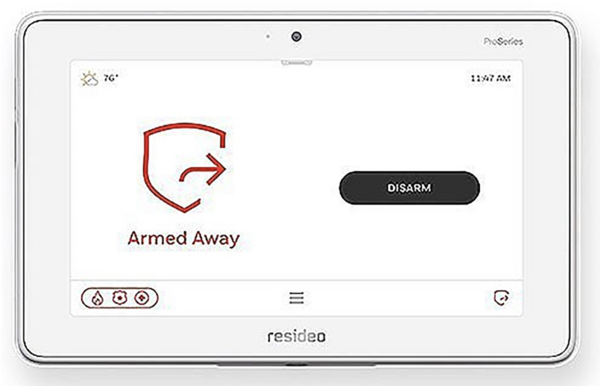
On the various touchscreen panels or keypads, you should be able to follow prompts on the display to silence and clear the trouble message. On the PRO Series panels, tap the red alert indicator at the bottom right of the display. This will silence the trouble beep and bring up the alert screen. Any active trouble conditions will be displayed. Press "Clear" at the upper right and enter a valid user code.

As with a VISTA system, if the trouble condition has been resolved, this will clear the display. If not, the message will remain under "Active Issues" until the trouble condition is resolved. In this case, until whatever is causing the communication problems has been taken care of. Once the condition has been resolved, press "Clear" again and enter your user code to clear the message.

Stay tuned, as we receive updates we'll update this blog post with any available information.

Tags: , , , , , , , , , , , ,

Comments


Posted By

Update 07/21/25: The Apple CarPlay integration is now available! You can see how to set it up in this helpful FAQ!

Apple CarPlay is designed to shift your attention from your phone to your car's built-in touchscreen, helping you keep your eyes where they should be – safely on the road ahead. Later this month, you can add the Alarm.com app to the growing list of apps available for use with Apple CarPlay.

The bad news is, far too many people are killed in traffic accidents caused by distracted driving. But, there's good news, too. According to the National Highway Traffic Safety Administration (NHTSA) that number has decreased steadily over the past few years. This decrease is likely due to options like Apple CarPlay, Android Auto, and other initiatives.

According to Alarm.com:

"We’re excited to announce that support for Apple CarPlay is on the way, empowering iPhone customers to effortlessly access their favorite smart security controls right from their vehicle’s display. With a simple, driving-friendly interface, they can stay focused on the road and connected to home, no matter where they go."

The addition of Alarm.com to Apple CarPlay is coming later this month, though an exact date has not yet been provided. In order to use Alarm.com with CarPlay, you'll need the latest app version, a compatible iPhone, and a vehicle or after-market stereo system that supports the feature.

What you can expect from the Alarm.com App in Apple CarPlay:

  • Receive critical alerts from your system straight to your vehicle's display.
  • Open and close compatible garage doors, simplifying your departure and arrival at home or work.
  • Activate custom scenes for Alarm.com-compatible automation devices.
  • Run Home and Away scenes for complete control of your system in one convenient location.

In conclusion, as technology like Apple CarPlay continues to evolve, it plays a vital role in reducing the dangers of distracted driving, contributing to safer roads for everyone. The upcoming integration of the Alarm.com app with Apple CarPlay is a prime example of this progress, bringing the convenience and control of your smart home security system directly to your vehicle's display.

This means you'll soon be able to manage alerts, control access, and activate scenes with simple, driver-focused interactions, keeping your attention on the journey ahead while staying connected to what matters most at home. Get ready for a safer and more connected driving experience when Alarm.com arrives on Apple CarPlay later this month.

Tags: , , , , , , , ,

Comments


Posted By

The First Alert VISTAH3 is Resideo's premiere hybrid panel. It offers built-in wired zones and a built-in PROSIX receiver. With an added module, it can support legacy RF from various manufacturers. However, a touchscreen keypad must be added for local programming, and WIFI isn't included.

The VISTAH3 supports up to 96 zones total, with up to four (4) partitions. There are eight (8) built in hardwired zones, expandable up to a total of 64 hardwired zones. The panel has an RJ45 connector built-in for hardwired Ethernet. If a hardwired network connection isn't possible, the panel can support WIFI with the addition of a module.

The VISTAH3 supports the following agency listings (in no particular order):

  • UL 985 - Household Fire
  • UL 1023 - Household Burg
  • UL 2610 - Commercial Burg
  • UL 1637 - Home Healthcare Signaling Equipment
  • UL 2017 - Safety General Purpose Signaling Devices
  • ULC S545 - Residential Fire Warning System Control Units (Canada)
  • ULC S304 - Standard for Control Units, Accessories and Receiving Equipment for Intrusion Alarm Systems (Canada)
  • ANSI/SIA CP-01 - False Alarm Reduction Standard

Once the VISTAH3 is registered with AlarmNet it can be used with Total Connect 2.0. This allows the end-user to monitor their system remotely, check system status, arm and disarm from nearly any location, control home automation devices that are associated with the account and view video, if included in the monitoring plan.

Like the Honeywell Home PROA7 and PROA7PLUS and the Resideo PROA7C and PROA7PLUSC the First Alert VISTAH3 can be programmed remotely through AlarmNet360 or locally through a touchscreen keypad. Unlike the PRO Series panels though, the VISTAH3 doesn't come with a touchscreen interface from the factory.

To add a touchscreen to the VISTAH3, you must also add WIFI capability. This can be done by adding either the PROWIFI (WIFI only) or the PROWIFIZW (WIFI and Z-Wave Plus). Once the panel has access to WIFI the Honeywell Home PROWLTOUCH, Resideo PROWLTOUCHC, or the First Alert VISTAHTCHWLC can be added.

Up to eight (8) touchscreen keypads are supported per VISTAH3 panel. You can read all about the number and types of supported keypads in this helpful FAQ. In the table below, we have a list of all the VISTAH3 associated products with links to each.

In addition to the individual components listed in the table, we provide a list of curated kits below. These kits make it easy for DIY customers to get all necessary items to program their system upon arrival. Click any link in the table for additional information on individual products, including specifications and documentation on the dedicated product pages.

First Alert VISTAH3 and Associated Products:

Product Image Description
First Alert VISTAH3 Hybrid alarm panel with eight (8) hardwired zones and PROSIX wireless capability built in.
Honeywell Home PROWIFI WIFI-only Module
Honeywell Home PROWIFIZW WIFI + Z-Wave Plus Module
First Alert VISTAHTCHWLC WIFI Touchscreen Keypad
Honeywell Home PROWLTOUCH WIFI Touchscreen Keypad
Honeywell Home PROLTE-A AT&T LTE
Cellular Module
Honeywell Home PROLTE-V2 Verizon LTE
Cellular Module
Resideo PROWLTOUCHC WIFI Touchscreen Keypad
First Alert VISTAHTKVRWL Legacy Wireless Takeover Module
First Alert VISTAHEXPHW Hardwired Expander
First Alert
VISTAHISO

iBus Isolator Module
(Isolates burg from fire
devices on the iBus.
Only required in commercial
fire applications.)
First Alert VISTAHRELAY iBus Relay Module
First Alert VISTAHTKVR-B iBus to ECP Expansion Converter
First Alert VISTAHTKVR-V iBus to V-PLEX Expansion Converter
First Alert VISTAHPKP iBus portrait-style
wired push-button keypad
First Alert VISTAHLKP iBus landscape-style
wired push-button keypad

First Alert VISTAH3 Kits Available from Alarm Grid:

  • First Alert VISTAH3PK:
    • 1 - First Alert VISTAH3 Hybrid Panel
    • 1 - Honeywell Home PROWIFI (WIFI-only) Module
    • 1 - First Alert VISTAHTCHWLC WIFI Keypad
  • First Alert VISTAH3PK-V:
    • 1 - First Alert VISTAH3 Hybrid Panel
    • 1 - Honeywell Home PROWIFI (WIFI-only) Module
    • 1 - Honeywell Home PROLTE-V2 Verizon LTE Module
    • 1 - First Alert VISTAHTCHWLC WIFI Keypad
  • First Alert VISTAH3PK-A:
    • 1 - First Alert VISTAH3 Hybrid Panel
    • 1 - Honeywell Home PROWIFI (WIFI-only) Module
    • 1 - Honeywell Home PROLTE-A AT&T LTE Module
    • 1 - First Alert VISTAHTCHWLC WIFI Keypad
  • First Alert VISTAH3PK-TCH:
    • 1 - First Alert VISTAH3 Hybrid Panel
    • 1 - Honeywell Home PROWIFIZW (WIFI & Z-Wave Plus) Module
    • 1 - First Alert VISTAHTCHWLC WIFI Keypad
  • First Alert VISTAH3PK-TCH-V:
    • 1 - First Alert VISTAH3 Hybrid Panel
    • 1 - Honeywell Home PROWIFIZW (WIFI & Z-Wave Plus) Module
    • 1 - First Alert VISTAHTCHWLC WIFI Keypad
    • 1 - Honeywell Home PROLTE-V2 Verizon LTE Module
  • First Alert VISTAH3PK-TCH-A:
    • 1 - First Alert VISTAH3 Hybrid Panel
    • 1 - Honeywell Home PROWIFIZW (WIFI & Z-Wave Plus) Module
    • 1 - First Alert VISTAHTCHWLC WIFI Keypad
    • 1 - Honeywell Home PROLTE-A AT&T LTE Module
  • VISTAH3IND1***:

***Note: The last kit listed above (VISTAH3IND1) does not contain the required equipment for programming the VISTAH3. To program, you will need to add a WIFI-capable module and a touchscreen keypad from the list of individual products in the preceding table.

Tags: , , , , , , , , , , , , , , , , , , , , , , , , , , ,

Comments


Posted By

Up to now, Alarm Grid has never enabled Pro Video with Analytics on Alarm.com video accounts unless specifically requested by the customer. This feature comes with additional costs that we have always covered. Now that Video Motion Detection is no longer an option, we've changed our policy.

Although Alarm.com ended support for enabling Video Motion Detection on new accounts in February 2023, its effect on our video customers only became clear to us recently. One of our customers alerted us to an issue that highlighted the impact of this change, prompting us to institute this new policy.

Please note that this policy change does not affect the monthly monitoring price for Platinum (Self or Full) Monitoring or Standalone Video Monitoring. This adjustment is simply to ensure our customers receive the full monitoring experience they expect. Below, we'll discuss the differences between Video Motion Detection and Video Analytics.

Video Motion Detection (VMD)

Method of Detection: VMD detects motion by analyzing brightness and color changes in user-defined pixel areas within camera images, eliminating the need for a separate motion detector.

Configuration: VMD settings are configured using VMD windows, which are drawn by the user on a live video preview. Users can adjust the sensitivity (how much change is needed to trigger an event) and target size (the percentage of the VMD window that needs to be filled by movement) for each window.

Recording Rules: VMD recording rules can be created to trigger recordings when motion is detected in specified VMD windows. However, for some camera series, the option to choose specific VMD windows to trigger a recording is not available; any motion in any window will trigger a recording.

Best Practices: For effective detection, it's recommended to draw longer and narrower boxes, similar to tripwires, in areas where motion should trigger a recording. Avoid placing windows in areas with constant or insignificant motion like moving trees or reflective surfaces. VMD windows should not overlap, as this can lead to false activations. For outdoor cameras, creating lines or barriers with the available windows is suggested instead of one large box.

Limitations:

  • VMD may not always function properly due to environmental factors like flying insects, falling leaves, or precipitation.
  • Certain older camera models do not show the VMD window turning orange upon motion detection during configuration.
  • The VMD windows for certain cameras are not visible to your alarm dealer (for troubleshooting purposes) in the Partner Portal, even after they've been configured.
  • Sensitivity settings may affect all VMD windows for some camera models.

New accounts created after February 2023 will no longer have the option to create VMD recording rules, as Alarm.com is moving forward with Video Analytics as their primary motion-activated recording solution. However, accounts created before this date, and older cameras that only support VMD will continue to be able to use VMD, and support for it will continue.

Video Analytics

Method of Detection: Video Analytics continuously scans a property and identifies and classifies objects such as people, vehicles, or animals. It can understand traffic patterns and detect specific behaviors like loitering, or objects crossing virtual lines.

Configuration: Video Analytics rules are configured using virtual tripwires (to capture movement through an area) or ground zones (to capture objects lingering in an area). Users can define the area of interest and specify the duration an object needs to be in a ground zone to trigger a recording.

Recording Rules: Video Analytics rules offer more advanced options, including the ability to trigger recordings based on the type of object (person, vehicle, animal) detected. Existing VMD recording rules must be deleted before setting up a Video Analytics rule. Users can create up to three Video Analytics rules per camera, and ground zones and tripwires can overlap.

Best Practices:

  • For accuracy, avoid drawing tripwires or ground zones over objects that move on their own (like trees or shrubs) and only draw the rule where the feet or wheels of the object should cross.
  • It's recommended to observe the rule's detections and then adjust the Minimum Object Detection Size or recalibrate the camera if needed.
  • Proper camera placement (height, angle, distance) is crucial for Video Analytics to function effectively.

Additional Features: Video Analytics enables enhanced notifications with thumbnail images of the detected objects. It can also be used to control lights based on detected events. Features like Perimeter Guard™ (alert sounds and flashing LED) and Package Alerts for specific doorbells rely on Video Analytics.

Additional Content on Video Analytics:

Summary of Key Differences:

Detection Method: VMD detects motion based on pixel changes within a specified area of the camera's field of view, while Video Analytics constantly scans the camera's view, identifying and classifying objects using cutting-edge technology and machine learning.

Precision: Video Analytics offers more precise detection and reduces false triggers by accurately identifying specific types of objects.

Rule Capabilities: Video Analytics allows for more sophisticated rules based on object type and behavior (e.g., loitering, crossing a line), unlike VMD which primarily reacts to general motion within a defined area.

Notifications: Video Analytics provides more comprehensive notifications with thumbnail images and object classification.

Summary:

In essence, Video Analytics is a more advanced and intelligent method of motion detection when compared to VMD. While VMD can be effective for basic motion detection on older systems, Video Analytics offers greater accuracy, more options, and better control over what triggers recordings and notifications.

Compatible Cameras:

Cameras That Support VMD Only:

If you are moving into a home or business with existing cameras and plan to activate new Alarm.com service after February 2023, please note that the following cameras support only Video Motion Detection (VMD), not Video Analytics. With these specific models and possibly other older cameras not shown here, you will only be able to view live video remotely; creating recording rules is not possible.

Camera Name Image
ADC-VS1
Analog to IP Converter
1-Channel
ADC-VS420
Analog to IP Converter
4-Channel
ADC-V510
Fixed Lens
Indoor Camera
ADC-VS520IR
Fixed Lens
Indoor Camera w/IR
ADC-V610PT
Indoor Pan/Tilt Camera
ADC-V620PT
Indoor Pan-Tilt
Camera
ADC-V700X
Weatherproof
Day/Night IP Camera
ADC-V720
Outdoor PoE
Night Vision
Bullet Camera


ADC-V820
Indoor PoE
Dome Camera
ADC-V521IR
Indoor Fixed
IR Camera
ADC-V721W
Wireless Outdoor
IP Night Vision Camera
ADC-V821
Outdoor PoE
Night Vision
Dome Camera
2GIG HD100
Indoor 720P
Camera w/ Night Vision

Cameras That Support Video Analytics:

See the table below for cameras compatible with Alarm.com's advanced Video Analytics. Given its superior accuracy for detecting threats and gathering information about your property compared to Video Motion Detection, we strongly recommend upgrading if your cameras currently only support VMD. Start planning your upgrade today, you'll be glad you did!

Camera Name Image
ADC-V515
Indoor 1080P
Camera
ADC-V522IR
Indoor 1080P
Night Vision Camera
ADC-V523/ADC-V523X
Indoor 1080P Camera
with IR Night Vision
ADC-V622
Indoor 1080P Camera
with IR Night Vision and
2-Way Audio
ADC-V722W
Outdoor 1080P
WIFI Camera with
Night Vision
ADC-V723/ADC-V723X
Outdoor 1080P Camera
with IR Night Vision and
High Dynamic Range (HDR)
ADC-V724/ADC-V724X
Outdoor 1080P WIFI Camera
with 2-Way Audio
ADC-VC726
Outdoor 1080P
PoE-Capable
Mini Bullet Camera
with Night Vision
ADC-VC727P
Indoor/Outdoor 1080P
PoE-Capable Mini Bullet
Camera
ADC-VC728PF
Indoor/Outdoor 1080P
Varifocal Bullet Camera
ADC-V729 / ADC-V729AC / ADC-VC729P
Outdoor 4MP Floodlight Camera
ADC-V729 - Powered by 24V DC
ADC-V729AC - Powered by 100V - 240V AC
ADC-VC729P - PoE-Capable or 24V DC Powered
ADC-VC736
Outdoor 1080P Large Bullet
PoE-Capable Camera
with Night Vision
ADC-VC826
ADC-VC827P
Indoor/Outdoor 1080P
Dome Camera
ADC-VC836
Outdoor 1080P
Turret Camera with
Night Vision
ADC-VC838PF
Indoor/Outdoor 1080P
Varifocal PoE-Capable
Turret Camera
ADC-VC847PF
Indoor/Outdoor 1080P
Varifocal PoE-Capable
Dome Camera
ADC-VDB750
Full HD Wired
Video Doorbell Camera
ADC-VDB755P
Full HD PoE-Capable
Video Doorbell Camera
ADC-VDB770
Full HD Wired
Video Doorbell Camera
with High Dynamic Range (HDR)
ADC-VDB780B
Full HD 2MP Battery-Powered
(Rechargeable)
Video Doorbell Camera
Also available in a bundle with the
ADC-W115C Wireless Chime Module.
Some installations will require
the ADC-W115C to use this
video doorbell camera.
If a cameras in the above list has no link it's because it is discontinued and no longer offered by Alarm Grid.
Tags: , , , , , , , , , , , , , , , , , , , , , , , , , , , , , , , ,

Comments


Posted By

Time for the CellBounce to, well, bounce. This device, which served as a temporary bridge for AT&T customers clinging to their 3G communicators, is now being discontinued. For those who rely on CellBounce to convert 3G signals for use on the LTE network, it's time to consider the next steps.


Mark your calendars: as of May 1, 2025, AT&T will officially cease support for CellBounce devices on its network. This means if you're currently relying on a CellBounce to bridge the gap between your old AT&T 3G/4G communicator and the AT&T LTE network, it's time to upgrade.

Failure to upgrade to a new LTE communicator, or a new system before the deadline will likely result in a complete loss of communication, compromising alarm signals. This includes critical life-safety signals like fire and carbon monoxide alerts.

You may be wondering which communicator to choose. Below, we'll give you some suggestions for how best to move past the Resideo CellBounce and that old 3G/4G communicator:

Alarm Panel LTE Communicator Recommended
Replacement
Panel
New Panel
LTE Communicator
L3000 LTE-L3A (AT&T)
LTE-L3V (Verizon)
PROA7PLUSC PROLTE-A (AT&T)
PROLTE-V2 (Verizon)
Lynx Touch
(L7000
L5210
L5000
Panel Firmware
9.00.209+
required)
LTE-L57A (AT&T)
LTE-L57V (Verizon)
PROA7PLUSC PROLTE-A (AT&T)
PROLTE-V2 (Verizon)
VISTA-20P
VISTA-15P
VISTA-10P
LTEM-XA (AT&T)
LTEM-XV (Verizon)
LTEM-PA (IP & AT&T)
LTEM-PV (IP & Verizon)
LTEM-PXA (IP* & AT&T)
LTEM-PXV (IP & Verizon)
LTEM-PIA
(IP & AT&T UL Residential Fire Rated)
LTEM-PIV
(IP & Verizon UL Residential Fire Rated)
VISTAH3 PROLTE-A (AT&T)
PROLTE-V2 (Verizon)
VISTA-21iP LTEM-XA (AT&T)
LTEM-XV (Verizon)
LTEM-PA (IP & AT&T)
LTEM-PV (IP & Verizon)
LTEM-PXA (IP & AT&T)
LTEM-PXV (IP & Verizon)
LTEM-PIA
(IP & AT&T UL Residential Fire Rated)
LTEM-PIV
(IP & Verizon UL Residential Fire Rated)
Must Disable Internal Comm.
VISTAH3

VISTA-21IPLTE
PROLTE-A (AT&T)
PROLTE-V2 (Verizon)

LTE-21V (Verizon)
No AT&T Option Available
for the VISTA-21IPLTE


*The LTEM-PXA and LTEM-PXV are unique in that they can support either a wired Ethernet connection or WIFI. To use WIFI, either the PROWIFI (WIFI Only) or the PROWIFIZW (WIFI and Z-Wave) module must be added.

We realize upgrading to a new panel may be a big undertaking for a DIYer. We've got content on upgrading from a VISTA-20P to a VISTAH3 and on upgrading from several older panels to the PROA7PLUS:

If you fail to replace the Resideo CellBounce before the deadline, here's what you may experience:

  • Communication Failures: "Comm fail," or communication failure, means your alarm system's regular check-in with AlarmNet didn't happen and they sent a message to the monitoring station. These supervision check-ins usually occur daily or monthly. If a comm fail happens, the monitoring station will normally contact the alarm dealer, who will then contact you, though exact procedures may vary. For Alarm Grid customers with cellular communicators, these check-ins are typically set for every day. It is possible that your system is set as "unsupervised". If that is the case, your system might be incapable of communicating and neither you nor the monitoring station would know.
  • Trouble message on display. This issue can vary widely, depending on your panel type and supervision settings. When a cellular communicator is in use, there is a "cell fault time" setting within communicator programming. By default, this is usually set to 60 minutes. With this setting, if the communicator loses contact with the cellular network for 60 consecutive minutes, a trouble message is displayed by the panel. This means you'll likely see that there is a problem before your alarm dealer. This may be displayed as a bF or Check 103 depending on the panel and keypad used. If a CellBounce is the issue, the most effective way to clear this message permanently is to disable the cellular communicator in panel programming. This will effectively disable cellular reporting. A better option is to upgrade the communicator or the system.

If you happen to have an IP and GSM communicator, it is usually possible, depending on your communicator version, to disable only the cellular path for the communicator. This will leave the IP communicator working. This might be a temporary solution, until you can upgrade to a new LTE communicator, or a new system.

The CellBounce was always intended as a short-term fix for a long-term problem. Let's face it, some people just don't like being told they have to upgrade their stuff. I remember when the old 2G network shut down, I had family members who clung to their old phones right up until the bitter end! But eventually, we all have to move with the times. Funny thing is, those same family members wouldn't give up their smartphones without a fight today.

Tags: , , , , , , , , , , , , , , ,

Comments


Posted By

Great news for Alarm Grid customers! We're excited to introduce the all-new Honeywell Home PROSIXMINI3, a discreet surface-mount contact perfect for blending into any décor. Despite its incredibly small size, .9" H x 1" W x 3.1" D, the PROSIXMINI3 offers reliable and effective protection.

Resideo, a leading provider of security solutions under the Honeywell Home, First Alert, and Resideo brand names, is now offering the PROSIXMINI3. This new, small form factor door and window contact is the latest in the company's ongoing effort to provide reliable and convenient encrypted security solutions.

The PROSIXMINI and PROSIXMINI2 remain available options. The introduction of the PROSIXMINI3 provides an additional choice for discreet protection on doors and windows. When selecting the ideal sensor, think of your specific requirements. If a low-profile design is most important, the PROSIXMINI, with its compact coin-style battery, is likely the best fit. However, if sensor depth is not a concern and a narrow form factor is desired, the PROSIXMINI2 or the new PROSIXMINI3 is more suitable.

As of now, the PROSIXMINI3 is only available in white. While additional color options may become available in the future, customers requiring a different color can easily paint the contact to match their décor. When painting, be sure to use a non-metallic paint to prevent any potential issues with the sensor's operation.

PROSIXMINI, PROSIXMINI2, and PROSIXMINI3 Feature Comparison:
Feature PROSIXMINI PROSIXMINI2 PROSIXMINI3
Image
Sensor Dimensions
(L x W x D)
2.44" x 1.25" x 0.45"
(6.1cm x 3.17cm x 1.14cm)
2.9" x 1.15" x .75"
(7.36cm x 2.92cm x 1.9cm)
3.1" x 1" x .9"
(7.87cm x 2.54cm x 2.28cm)
Magnet Dimensions: 1.7" x .4" x .6" (43.7mm x 10.8mm x 14.9mm)
Maximum Magnet Gap 1.15" (2.9cm) (Wood), 0.5" (1.2cm) (Steel) 1.15"
(2.9cm)
1"
(2.54cm)
Wireless Range (in Open Air) 200'+
61m +
300'+
91m +
300'+
91m +
Encryption Type 128-bit AES 128-bit AES 128-bit AES
Battery (Included) One (1) 3V Lithium CR2450 Coin Battery One (1) 3V Lithium CR2 One (1) 3V Lithium CR2
Battery Life w/ Typical Use ~5 Years ~7 Years ~7 Years
Low Battery Threshold 2.3 VDC 2.3 VDC 2.3 VDC
LED Indicator Yes, One Green LED
Indicates Enrollment and Tamper
Yes, One RGB LED
Green LED indicates Tamper and Enrollment
Red LED indicates Low Battery
Blue LED indicates Magnet in Range
Yes, One Green LED
Indicates Enrollment and Tamper
Auto Enrollment ✔️ ✔️ ✔️
RF Supervision ✔️ ✔️ ✔️
Tamper Detection ✔️ ✔️ ✔️
Low Battery Supervision ✔️ ✔️ ✔️
Compatible w/ PRO Series ✔️ ✔️ ✔️
Compatible w/ VISTAH3 ✔️ ✔️ ✔️
Indoor/Outdoor Indoor Only Indoor Only Indoor Only
Operating Temperature 32°F - 122°F
(0°C - +50°C)
32°F - 122°F
(0°C - +50°C)
32°F - 122°F
(0°C - +50°C)
Operating Humidity 5% - 95%
Non-condensing
5% - 95%
Non-condensing
Max 95%
Non-condensing

Ensure seamless security integration with the PROSIX lineup of sensors from Resideo and Honeywell Home. These sensors are fully compatible with the Honeywell Home PROA7, Resideo PROA7C, and PROA7PLUSC panels, as well as the First Alert VISTAH3 hybrid alarm system, providing robust encrypted wireless protection for total peace of mind.

Tags: , , , , , , , , , , , , , ,

Comments


Posted By

Give Back/Get Back is a program sponsored by electric utility companies in the US. During the summer, when electricity usage is at its peak, these companies offer an incentive for customers with smart thermostats to allow the adjustment of their thermostats during peak usage, lowering demand.

Our first blog about Give Back/Get Back (Demand Response) was in May of 2020. Now, over twenty electric utility providers participate in the program, with thousands of customers taking advantage of these incentives.

Here's how the Give Back/Get Back program typically works: On extremely hot or cold days, when energy demand surges, your utility company partners with Alarm.com to make small, temporary temperature adjustments in participating homes. These adjustments, usually no more than four (4) degrees Fahrenheit, may last up to four (4) hours.

The adjustment lowers the demand on the power grid and also saves you money by causing your electric air conditioning or heating usage to be reduced. Those who heat their homes using gas, wood burning stoves, or other non-electric means can still participate if they cool their homes using electricity and have a qualified, internet-connected thermostat.

The two newest areas participating in Give Back/Get Back are PJM Utility and the Tennessee Valley Authority (TVA). PJM Utility calls its program "Power Savers MidAtlantic" and the TVA calls its program "EnergyRight Smart Thermostat Rewards".

PJM Utility:

To participate under the PJM Utility program you must:

  • Be a resident of Ohio or Illinois and a customer of ComEd, Duke Energy Ohio, or AEP Ohio.
  • Have a qualifying, internet-connected smart thermostat.
  • Agree to allow the utility to adjust your thermostat setting during peak energy usage times.
  • Connect your utility account through the PJM Utility partners Voltus or Arcadia.

In exchange for their participation in the program, PJM Utility customers who sign up will receive an entry in a sweepstakes for $10,000. Each event that you participate in will give you another entry into the sweepstakes. You always have the option to choose not to participate in a temperature offset event in either program. For full details on the PJM Utility Power Savers Mid-Atlantic program, click here.

Tennessee Valley Authority:

  • If you live in the seven-state Tennessee Valley region you can check whether your utility is participating here. If it is, enroll your qualifying thermostat here.
  • Have an internet-connected, qualifying smart thermostat.
  • If your primary heat source uses electricity and you have electric cooling, you're eligible for the year-round program.
  • If you use natural gas, wood-burning, or any other non-electric powered heat, and electricity for cooling you can still participate in the summer-only program.

In exchange for your participation, you will receive a $65 enrollment rebate for both the year-round and the summer-only program. Year-round participants will then receive a yearly $65 rebate as long as they continue to participate or until the program ends. Summer-only participants will receive a $20 rebate per participation year for the life of the program. You can read the full details of the TVA program here.

Alarm.com calls this Give Back/Get Back, but each utility company has their own program name. If you haven't seen us write about your utility provider, you can check to see if they participate in partnership with Alarm.com by going to thermostatrewards.com and looking for your electric utility's name. If it is listed, click the link and find out about your potential rewards for participation and what's required to sign up.

If you don't have a smart thermostat yet, your utility's program page likely lists compatible models, and often provides discounted purchase links. Once you install and connect your thermostat through Alarm.com, you can easily enroll in the program. Remember, incentives vary by utility, so review your company's specific program details. Investing in a smart thermostat is a wise choice, often paying for itself quickly through energy savings and program incentives.

Supported Alarm.com Thermostats:

The list of supported thermostats can vary by utility company, but in this case, both PJM and TVA support the same list of Alarm.com compatible thermostats.

Tags: , , , , , , , , , , , , , , , ,

Comments


Posted By

Unlike Resideo, Alarm.com doesn't manufacture alarm panels. Instead, they work with various panel manufacturers to provide alarm signal transport and remote control capabilities for their panels. Many users prefer the Alarm.com platform for its clean look and intuitive user interface (UI).

There are a couple of panel manufacturers who offer all-in-one systems that can easily replace a Lyric. The exception is for those users who have embraced Apple HomeKit. There is currently no Alarm.com capable panel that also supports HomeKit. There may never be. So, if you're firmly in the HomeKit camp, this option is probably not for you.

This post focuses on two Alarm.com-compatible panels: the 2GIG Edge and the Qolsys IQ Panel 4. Alarm.com requires cellular communication, and these panels cannot be registered without it. Therefore, each panel includes a built-in LTE cellular communicator, available in either AT&T or Verizon versions. Be sure to choose the cellular carrier who will have the best signal inside the protected premises.

While many Alarm.com systems support older Honeywell/Resideo wireless sensors, SiX Series sensors from a Lyric panel are incompatible and require replacement. Both Qolsys and 2GIG offer their own encrypted sensor options.

As mentioned above, users often find the Alarm.com user interface (UI) more intuitive than Total Connect 2.0. Additionally, Alarm.com consistently innovates, updates, and adds features that enhance the usability of their platform. Resideo also does this with Total Connect 2.0, but not as regularly. Alarm.com is also highly responsive to customer feedback, demonstrating a commitment to improving the Alarm.com user experience.

Another advantage is that the Alarm.com camera lineup is miles ahead of Resideo's. They offer a dizzying array of both residential and commercial grade cameras. If you're particular about your video options or you're just now looking to add video to your home or business for the first time, then Alarm.com is sure to have the right combination of cameras for you.

Replacing the Lyric with a 2GIG Edge:

2GIG was founded by two former Honeywell employees, so it stands to reason that all 2GIG panels can support legacy Honeywell sensors. Since its founding, 2GIG has expanded on its sensor compatibility and now offers encrypted sensors in their eSeries 345 MHz frequency, as well as long-range encrypted 900 Mhz sensors via the E+ Series.

Panel Hardware Options:

Both the 2GIG Edge With AT&T LTE communicator and the 2GIG Edge With Verizon LTE Communicator feature an LTE cellular communicator, 2.4 GHz WIFI capability, Z-Wave Plus V2 (700 Series), and a vertically adjustable front-facing camera. It is a very solidly built panel with a 7" LCD touchscreen interface. For a complete list of specifications, see the full data sheet.

The 2GIG Edge offers exceptional sensor versatility, supporting legacy Honeywell 5800 Series sensors, legacy 2GIG sensors, and the new encrypted 2GIG eSeries and E+ Series sensors. This comprehensive compatibility allows users to protect virtually any part of their property.

The E+ Series sensors boast a remarkable range of up to 2km, depending on environmental conditions. This impressive range extends protection to previously unreachable areas like barns or outbuildings.

One of the 2GIG Edge's most compelling features is its facial recognition disarming, a capability currently unavailable on the other panels we've discussed. Unlike cloud-based biometrics, the Edge stores all facial recognition data locally, ensuring your personal information remains exclusively on your system.

2GIG Edge Vs. Resideo PROA7PLUS - Feature Comparison

Replacing the Lyric with a Qolsys IQ Panel 4

Similar to the 2GIG Edge, Qolsys offers the IQ Panel 4 which is compatible with legacy Honeywell 5800 Series 345 MHz and 2GIG 345 MHz* sensors. In addition, it supports PowerG 915 MHz sensors. These sensors offer encryption, two-way communication and an impressive transmitting range to rival the 2GIG E+ Series.

*The Qolsys IQ Panel 4 cannot support the 2GIG eSeries 345 MHz sensors.

Panel Hardware Options:

Being an Alarm.com panel, the IQ Panel 4 includes a built-in AT&T or Verizon LTE cellular communicator. Additionally, IQ4 versions support various legacy sensors: Honeywell/2GIG (345 MHz), DSC (433 MHz), or Interlogix/Qolsys (319.5 MHz). Therefore, when selecting an IQ Panel 4, be sure you choose the correct communicator and legacy receiver to replace your Lyric. You can choose either the Qolsys IQ Panel 4, 345 MHz with AT&T & PowerG or the Qolsys IQ Panel 4, 345 MHz with Verizon & PowerG.

In addition to supporting 345 MHz legacy sensors and PowerG long-range wireless sensors, each IQ Panel 4 offers dual-band, 2.4 GHz or 5 GHz WIFI capability, Z-Wave Plus V2 (700 Series), Bluetooth disarm and audio streaming, front-facing camera for optional disarm photos, and a 7" touchscreen interface. Check out the specification sheet for a full list of features.

Using Alarm.com:

Curious about the Alarm.com experience? Alarm Grid provides a demo account for you to explore its user interface. Use the following login credentials to get started at:
www.alarm.com/login:

  • USERNAME: ADCDemo@alarmgrid.com
  • PASSWORD: DemoP@ssw0rd

This demo account is fully loaded, providing a glimpse into features like motorized shades, locks, and water valves with water usage monitoring. The specific features available to you with an activated Alarm.com account will depend on the hardware installed in your unique system.

Be sure to check out the rest of this series on Preparing For the Eventual Lyric End-of-Life. In Part 1, we discuss the considerations when continuing to use the Lyric. In Part 2 we discuss replacing the Lyric with another all-in-one panel, in particular with one of the PRO Series systems. In Part 3 we discuss replacing the Lyric with one of the new Resideo First Alert hybrid panels, the VISTAH3.

Preparing for the Eventual Lyric End-of-Life - Part 3

Tags: , , , , , , , , , , , , ,

Comments


Posted By

Although users accustomed to the Lyric's all-in-one style and convenience are unlikely to switch to a hybrid panel, it is still possible. Therefore, in this installment of "Preparing for the Eventual Lyric End-of-Life," we will discuss replacing the Lyric with the new First Alert VISTAH3.

Replacing The Lyric With A Hybrid Panel:

The First Alert VISTAH3 may be a good choice to replace an aging Lyric. Much like the PRO Series panels, the VISTAH3 supports SiX and PROSIX sensors right out of the box. It can also support a variety of wired and wireless devices.

The VISTAH3 is more of a traditional system, like the VISTA-20P. The main control panel is installed in a remote location, away from entry points. Then, either wired or wireless keypads are used to control the system. This is the first panel Resideo has produced that can support wired zones, wireless devices, legacy wireless, ECP zone expansion, and V-PLEX zone expansion. That's every type of expansion the company has ever made.

While the VISTAH3 might seem complex, its programming closely resembles that of the PRO Series panels. When replacing a Lyric system, you may not immediately utilize the new panel's more advanced features. However, it's nice knowing these capabilities are available for future expansion.

Recommended Keypads:

DIY installers of the VISTAH3 should be aware that local programming requires a touchscreen WIFI keypad. This means adding either a PROWIFI (WIFI-only) or a PROWIFIZW (WIFI and Z-Wave Plus) module before connecting a programming keypad.

There are three (3) touchscreen keypads to choose from when using the VISTAH3. The Honeywell Home PROWLTOUCH, the Resideo PROWLTOUCHC, and the First Alert VISTAHTCHWLC. If you'll be purchasing a new touchscreen keypad for use with this panel, we recommend the First Alert model. It is compatible with all versions of the VISTAH3 panel without having to undergo a firmware update.

Before using either the PROWLTOUCH or PROWLTOUCHC with the VISTAH3, a firmware update is required. This update can take up to 30 minutes to download and install. The VISTAH3 panel must be registered and updated first; then, it will automatically push the necessary firmware to the keypad. If you intend to set up and program your system before registration, the First Alert VISTAHTCHWLC is the best keypad for you.

Although touchscreen keypads offer the best functionality and control of both the system and automation devices, it is recommended that you have at least one wired keypad to provide control of the alarm system in the event of a wireless failure.

The First Alert VISTAHLKP and First Alert VISTAHPKP both connect to the panel through the iBus. This new bus technology leverages RS-485 and provides robust flexibility for long wire runs.

RS-485 is not a protocol. Instead, it's a standard that defines the electrical characteristics of drivers and receivers in a serial network. It's been commonly used in manufacturing automation for years due to its relative immunity to electrical noise. It supports long wire runs in noisy environments and multiple devices connected to a single bus.

Support for Legacy Wireless:

The VISTAH3 is compatible with the First Alert VISTAHTKVRWL for legacy wireless zone support. This legacy wireless takeover module works exactly like the PROTAKEOVER module used with the PROA7C and PROA7PLUSC. The biggest difference between the two modules is in their antennas.

The PROTAKEOVER includes a new PRO Series panel backplate with integrated antennas. The original backplate must be replaced for proper module function. Similarly, the VISTAHTKVRWL utilizes two external antennas, installed within the VISTAH3 panel's enclosure, to ensure effective wireless signal reception.

Similar to the PROTAKEOVER, the VISTAHTKVRWL cannot support multiple legacy wireless frequencies simultaneously. That means it cannot support both 5800 Series 345 MHz sensors and 2GIG 345 MHz sensors. If your Lyric panel incorporates both sensor types, a decision will have to be made as to which wireless series to keep and which to replace.

Communicators:

The VISTAH3 features an integrated Ethernet communicator. If a wired Ethernet connection is unavailable, or if you plan to use a WIFI keypad, you'll need to add either the PROWIFI (WIFI-only) or PROWIFIZW (WIFI and Z-Wave Plus) module. For enhanced reliability, consider installing either the PROLTE-A or PROLTE-V2 LTE cellular communicator. However, similar to the PRO Series, the VISTAH3 requires an Ethernet or WIFI connection for firmware updates. Over-the-air updates are not allowed via cellular connection.

Total Connect 2.0:

As with choosing a PRO Series panel as a replacement for the Lyric the First Alert VISTAH3 also comes with the added convenience of supporting Total Connect 2.0 (TC2). Whether you've already been using TC2 with the Lyric, or you want to begin using it with the replacement panel, the VISTAH3 provides you with that opportunity.

TC2 is the remote accessibility platform offered by AlarmNet. AlarmNet is a subsidiary of Resideo. It started life as a means of providing backup communication for alarm systems that relied on telephone lines for a communication path. A savvy burglar could cut the phone lines from outside the building, then make entry, secure in the knowledge that the alarm system was unable to communicate.

AlarmNet changed all that by providing cellular communication capabilities for alarm systems. Those old analog cellular communicators were used only in instances where the primary means of communication, namely the copper phone line, was compromised.

Now, cellular communication is often the primary or the only communication path used. With the addition of IP communication, in the form of an Ethernet or WIFI path alarm users can have the best of both worlds. The speed of IP communication with the reliability of cellular. Total Connect 2.0 leverages these paths to provide remote control, along with real-time remote monitoring and notification capability.

Be sure to check out the rest of this series on Preparing For the Eventual Lyric End-of-Life. In Part 1, we discuss the considerations when continuing to use the Lyric. In Part 2 we discuss replacing the Lyric with another all-in-one panel, in particular with one of the PRO Series systems. In Part 4 we discuss using an Alarm.com compatible system as a replacement.

Preparing for the Eventual Lyric End-of-Life - Part 2

Preparing for the Eventual Lyric End-of-Life - Part 4

Tags: , , , , , , , , , , , , , , , , ,

Comments